What is Computer Use? How AI Automates Tasks by Controlling Your Screen

Lead
Computer Use is a technology that enables AI agents to view screens just as humans do, operate applications through mouse and keyboard input, and automate tasks that lack APIs. While conventional RPA was essentially "playback of predetermined procedures," Computer Use differs in that it understands the current state of the screen and independently determines the next action to take.
This article is intended for IT managers and DX promotion officers at B2B companies operating in Thailand, providing a comprehensive explanation covering the underlying mechanisms, applicable tasks, implementation procedures, and security measures. By the end of the article, readers should be equipped to determine which business processes to start with and where human review should be retained.
Computer Use gives AI agents "eyes" (screen recognition) and "hands" (action execution), enabling them to operate systems on behalf of humans—even those without APIs. We begin by clarifying the definition and the distinctions from RPA and API-integrated agents, with which it is often confused.
Definition and Differences from RPA and API Agents
Computer Use works by having the model interpret a screen captured as a screenshot, then determine "where to click next and what to input," and generate the corresponding actions. Rather than fixing coordinates or selectors in advance, it constructs operations by working backward from the objective—even when the screen layout changes somewhat.
In summary, the three approaches are differentiated by "resilience to change" and "connection method." Conventional RPA is stable because it records and replays coordinates and object IDs, but is vulnerable to screen changes. API-integrated AI agents are the fastest and most reliable option when the target system exposes an API, but cannot be used when no API is available. Computer Use fills the gap—tasks where there is no API and where the screen is subject to change.
| Item | Conventional RPA | API-Integrated Agent | Computer Use |
|---|---|---|---|
| Connection method | Screen coordinates/ID recording | System API | Visual understanding of the screen |
| Resilience to screen changes | Weak | N/A | Relatively strong |
| API not required | Yes | No | Yes |
| Speed and reliability | Medium | High | Medium (involves trial and error) |
| Suited for | Routine, high-frequency tasks | Integrations with APIs | Semi-routine tasks without APIs |
In practice, the choice is not simply "RPA or Computer Use." A realistic approach is to use APIs where available, RPA for routine tasks with stable screens, and Computer Use to supplement everything else.
Why Computer Use Is Gaining Attention Now
The growing attention stems from multimodal models reaching a level of screen comprehension that is now sufficient for practical business use. The ability to read UI elements from screenshots and identify buttons and forms has brought tasks that were previously considered impossible to automate via API within reach of automation.
Research firms also project rapid expansion of enterprise agent adoption over the coming years. Gartner predicts that the share of enterprise applications incorporating task-specific AI agents will grow from less than 5% to 40% by 2026 (Source: Gartner, 2025). At the same time, many observers note that while pilot projects are advancing, only a limited number of companies have reached full production deployment. The gap between a "working demo" and "operations you can actually rely on" is the wall that companies are now up against.
In B2B environments across Thailand and the broader ASEAN region, it is common for core systems and supplier portals to lack APIs. This is precisely why Computer Use—which bridges those gaps through screen operation—holds comparatively high practical value.
How Computer Use Works

Computer Use operates on a loop that rapidly repeats "observe the screen → perform an action." This section explains both the basic flow by which a single action is generated, and the plan–execute–verify cycle required to complete an entire task.
Basic Flow: Recognizing and Operating the Screen
The basic 1-cycle generally proceeds as follows.
- Screen capture: Capture the current screen as a screenshot.
- Situation understanding: The model reads the text, buttons, and input fields on the screen to grasp the current state.
- Action decision: Based on the gap between the goal and the current state, determine the next move — such as "click this element" or "enter text in this field."
- Action execution: Convert the decision into actual operations — mouse movement, clicks, key input, scrolling, etc. — and execute them.
- Result verification: Re-capture the screen after the operation and confirm whether it proceeded as intended.
Because this loop runs for each individual operation, even if a button's position has shifted slightly from before, the system can re-examine the screen and adapt. On the other hand, since screen comprehension is involved at every step, it takes more time than directly calling an API, and misclicks can occur on complex screens. This is precisely why the design of verification and human confirmation — discussed later — is critical to quality.
The Plan–Execute–Verify Loop
Even when individual operations are chained together, that alone is not enough to complete multi-step tasks such as "process 30 invoices." To achieve stability in real-world use, a higher-level loop of planning and verification must be layered on top.
- Plan: Decompose the task into sub-goals. For example, lay out the steps as "log in → open the target list → enter data one by one → save → move to the next."
- Act: Run the previously described operation loop for each sub-goal.
- Check: Verify the completion condition for each sub-goal (e.g., "did the save confirmation message appear?"), and if it failed, either retry or escalate to a human.
This approach of designing a multi-layered "Plan → Act → Check" cycle is closely connected to AI agent orchestration, which coordinates multiple agents and procedures. The idea of preventing mistakes through systematic design rather than individual attention is also shared with harness engineering. Skipping verification makes it easy for a single mid-process error to go unnoticed all the way to the end, leading to incidents where large amounts of incorrect data are registered.
Tasks That Can Be Automated and Application Areas

Computer use is effective for tasks where "there is no API × screen operations are close to routine × volume is high." We will examine this through two representative areas: operating legacy systems, and information gathering and report creation.
Operating Legacy Systems and Government Portals Without APIs
The area where the most value can be generated is operating internal systems or external portals that do not expose an API. In Thai B2B settings, there are still many tasks that can only be performed through a screen — long-used core systems, order management portals for various suppliers, and government agency application sites, to name a few.
Examples include entering the same purchase order information into multiple supplier portals, checking application statuses on government portals every morning and compiling them into a list, and transcribing invoice contents into a legacy ERP. These tasks are monotonous and time-consuming when done manually, and transcription errors are prone to occur.
For procurement flows where API integration is possible, it is more reliable to build on an API basis rather than relying on screen operations (this area is covered in B2B Procurement Automation with AI Agents). Computer use is best positioned as a last resort for counterparties where an API "simply cannot be arranged," which makes its role clear.
Information Gathering, Comparison, and Report Generation
Another common use case is gathering information across multiple sites and systems, comparing it, and compiling it into a standardized report. This includes regular monitoring of competitor prices, checking inventory and lead times across multiple vendors, and capturing screenshots of internal dashboards with summaries.
These are classic examples of "humans visiting the same screens every day and copy-pasting," where the automation benefits of computer use are easy to see. Since browser operations are central, it is also well-suited to adapting to layout changes on target sites.
However, using collected data directly for decision-making is risky. Since there is a possibility of misreading screen content or capturing outdated cached displays, outputs should always record "when and from which screen the data was retrieved," and important figures should be verified by a human as part of the workflow.
Steps to Implement Computer Use

The golden rule for implementation is "validate on a small scale, then expand while keeping human review in place." Proceed in three steps: selecting the target workflow, moving from PoC to production, and incorporating human-in-the-loop (HITL) checkpoints.
Selecting Target Tasks and Evaluating Cost-Effectiveness
The first hurdle is deciding which workflow to start with. The more of the following conditions a workflow satisfies, the higher the likelihood of early success.
- The procedure is reasonably well-defined, with few decision branches
- The work is primarily screen-based and difficult to replace with an API
- The volume is substantial, making it easy to quantify the value of automation
- Failures are not catastrophic (not directly tied to financial transactions, contracts, or legal compliance)
For cost-effectiveness, estimate the current labor cost of the target workflow (headcount × hours × frequency) alongside the build and operating costs. The framework in Measuring ROI After AI Agent Implementation is a useful reference for investment decisions.
Conversely, selecting a high-risk workflow—such as finalizing contract amounts or executing payments—for full automation from the outset can result in significant losses if something goes wrong, and can quickly erode internal trust. The standard approach is to start with workflows that are "repetitive but recoverable if something goes wrong."
Moving from PoC to Production
Once the target is identified, avoid a full rollout and start with a small PoC instead. Specifically, limit the scope to a subset of the target workflow (for example, one location, one supplier, or a few dozen cases) and measure success rate, processing time, and the number of human interventions required.
In a PoC, what matters is not "how many times it succeeded" but "how it fails." Identify which screens cause problems and which exceptions (pop-ups, session timeouts, unexpected error messages) bring the process to a halt, then prepare the appropriate branching logic and retry handling for production.
The transition from PoC to production involves many considerations common to agent operations in general. For a detailed look at how to move from a pilot to scaled production, refer to Taking AI Agents into Production. If validation reveals that the success rate falls short of business requirements, it is also important to make the call to narrow the target scope rather than forcing a broader rollout.
Incorporating HITL (Human-in-the-Loop)
The key to operating computer use safely is to not try to automate everything. Designing HITL checkpoints before high-risk operations is the practical solution for preventing incidents while still expanding the scope of automation.
- Operations that can proceed automatically: Reversible actions such as viewing, transcribing, and saving drafts.
- Operations requiring human approval: Actions that are difficult to undo, such as sending, finalizing, making payments, and placing external orders.
The thinking behind this distinction is explained systematically in Human-in-the-Loop (HITL). Adding too many approval-required operations diminishes the benefits of automation, so the balance between "how much to delegate and when to call in a human" should be calibrated against risk and volume. Once operations have stabilized, a safe approach is to gradually loosen approval thresholds and incrementally expand the scope of what is delegated.
Security and Risk Management During Implementation

Because computer use "hands AI the same access rights a human operator has," putting off permission design and risk mitigation can lead to significant damage. Make sure to address least-privilege principles, sandbox isolation, and preparedness for both misoperations and terms-of-service considerations.
Least Privilege and Sandbox Isolation
Computer use agents operate with the same account permissions as the account used to control the screen. In other words, anything that account can do, the agent can do as well. Therefore, the starting point is to prepare a dedicated account for the agent and grant it only the minimum permissions necessary for the task. This concept is covered in detail in AI Agent Permission Design (Least Privilege).
Additionally, using a sandbox that isolates the execution environment from the production network and sensitive data can contain the damage if an agent behaves unexpectedly. Sandboxes for Running AI Agents Safely is a useful reference for setting up an isolated environment. Operating on the assumption that "if the screen is visible, all the data behind it is accessible," it is important to physically restrict both what can be shown and what operations can be performed.
Preparing for Misoperation, Automation Bias, and Terms of Service Issues
Beyond technical risks, there are three operational points to keep in mind.
The first is misoperation. Mistakes such as pressing the wrong button due to a misread screen, or executing the same operation twice, can happen. Keep screenshots and operation logs before and after critical actions so that they can be reviewed and rolled back later.
The second is automation bias. This refers to the tendency for humans to uncritically trust an agent's output. Even if a reviewer is assigned, it is meaningless if they wave things through thinking "it's probably correct." Countermeasures are summarized in Mitigating AI Automation Bias.
The third is terms of service and compliance. Automatically operating external websites or portals may be prohibited under the terms of service of those sites. In fact, legal disputes over automated browsing by agents have begun to surface. It is essential to review the terms of service of target sites in advance and operate within the scope of what is permitted.
Key Considerations for B2B Companies in Thailand and ASEAN

In ASEAN business environments, "multilingual screens" and "local data protection laws" are the unique considerations for computer use adoption. The following outlines key points specific to the local context, with a focus on Thailand.
Balancing Multilingual and Local System Support with PDPA Compliance
In B2B environments across Thailand and the broader ASEAN region, it is not uncommon for system screens to mix multiple languages such as Thai, English, and Japanese. Computer use, which understands screens visually, is relatively well-suited to such multilingual UIs; however, since recognition accuracy varies by language, it is advisable to validate performance for each target language.
Data protection considerations are also essential. Starting with Thailand's Personal Data Protection Act (PDPA), countries across ASEAN have regulations governing the handling of personal data. When an agent handles screens displaying customer or employee information, the screen data and screenshots themselves may be subject to protection. It is necessary to design systems that minimize the scope and retention period of logs and screenshots, and that restrict access to them. For specific compliance items in Thailand, please refer to Thailand PDPA Compliance and AI Adoption Checklist.
Frequently Asked Questions (FAQ)

The following is a compilation of questions that frequently arise when considering the adoption of computer use.
Q1. Should I Switch from RPA to Computer Use?
Switching over is not always necessary. For tasks with stable screens and fully standardized procedures, traditional RPA is often faster and more reliable. Computer use has the advantage in tasks where RPA maintenance overhead is high — such as those involving frequent screen changes, many exception patterns, or a wide variety of target systems. The two are not competitors; the practical approach is to use each according to the nature of the task. For perspectives on RPA and AI collaboration, AI Hybrid BPO is also worth referencing.
Q2. Which Tasks Should I Start With?
The golden rule is to start with tasks that are repetitive, high in volume, and recoverable if mistakes occur. Specifically, good entry points include data entry into portals without APIs, gathering information from multiple sites and compiling it into reports, and transcribing data into legacy systems. Conversely, for high-risk tasks such as finalizing payments or executing contracts, it is advisable to begin cautiously with partial automation that incorporates thorough human review.
Q3. What Are the Minimum Requirements to Avoid Failures in Production?
There are three minimum requirements. First, always insert a human confirmation step (HITL) before any high-risk operation. Second, retain operation logs and screenshots so that failures can be investigated and rolled back. Third, run agent-dedicated accounts with least-privilege permissions and isolate the execution environment. Proceeding to full automation without these three elements in place makes it easy for a single erroneous operation to result in large-scale data corruption.
Conclusion

Computer use is a technology that extends automation to tasks without APIs by having an AI agent observe the screen and perform operations. It delivers particular value for tasks that traditional RPA has struggled with — those involving changing screens or frequent exceptions — as well as for operating legacy systems and government portals that lack APIs.
At the same time, since the agent inherits the same operational permissions as a human user, the absence of a foundation built on least-privilege access, sandbox isolation, human confirmation (HITL), and operation logs risks causing serious incidents rather than improving efficiency. The path to moving beyond a demo and sustaining real-world use is to start small with tasks that are "repetitive but recoverable," observe how failures occur, and gradually expand the scope of what is delegated.
We support AI agent implementation tailored to B2B operations in Thailand and across ASEAN. If you would like help identifying which tasks to tackle first, please feel free to reach out.
Author & Supervisor

Yusuke Ishihara
Started programming at age 13 with MSX. After graduating from Musashi University, worked on large-scale system development including airline core systems and Japan's first Windows server hosting/VPS infrastructure. Co-founded Site Engine Inc. in 2008. Founded Unimon Inc. in 2010 and Enison Inc. in 2025, leading development of business systems, NLP, and platform solutions. Currently focuses on product development and AI/DX initiatives leveraging generative AI and large language models (LLMs).
Recommended Articles


Terms related to this article
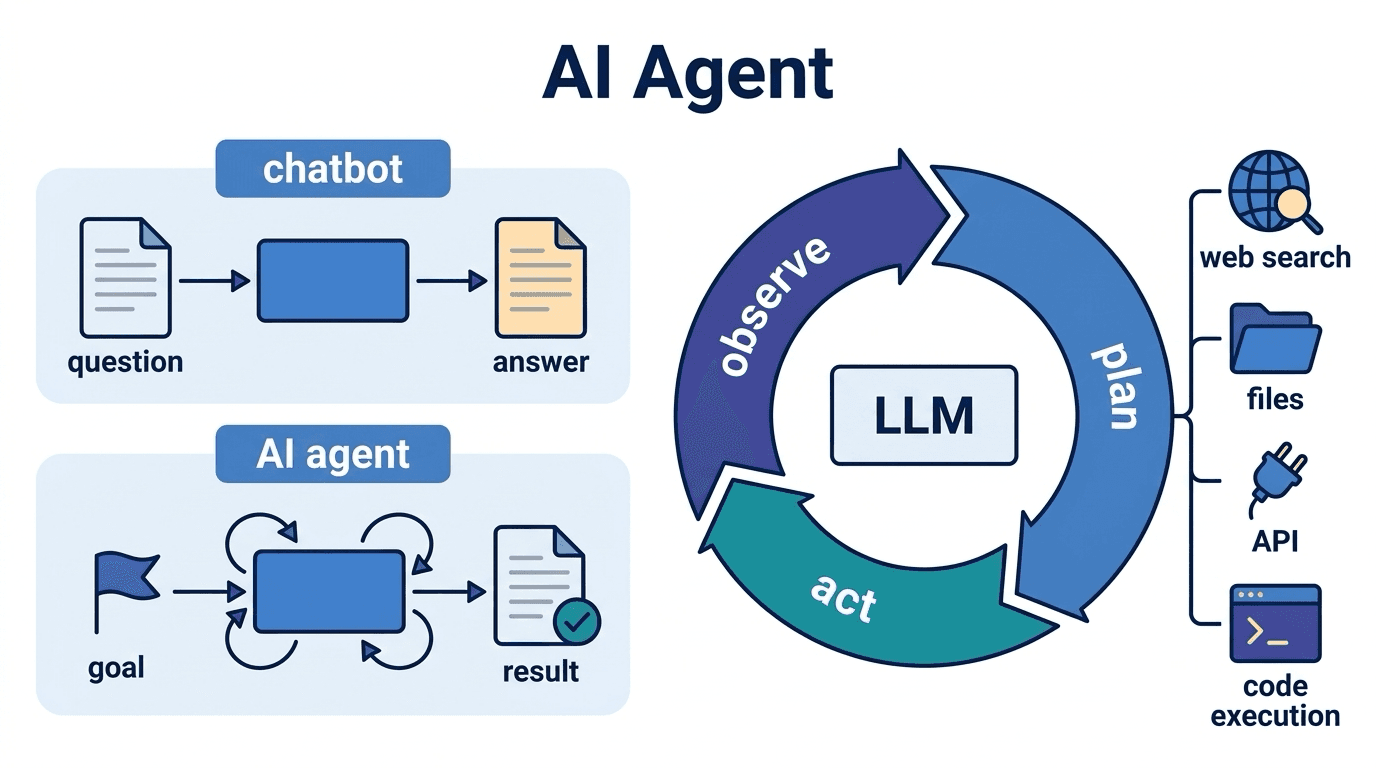
AI Agent
An AI agent is an AI system that autonomously formulates plans toward given goals and executes tasks
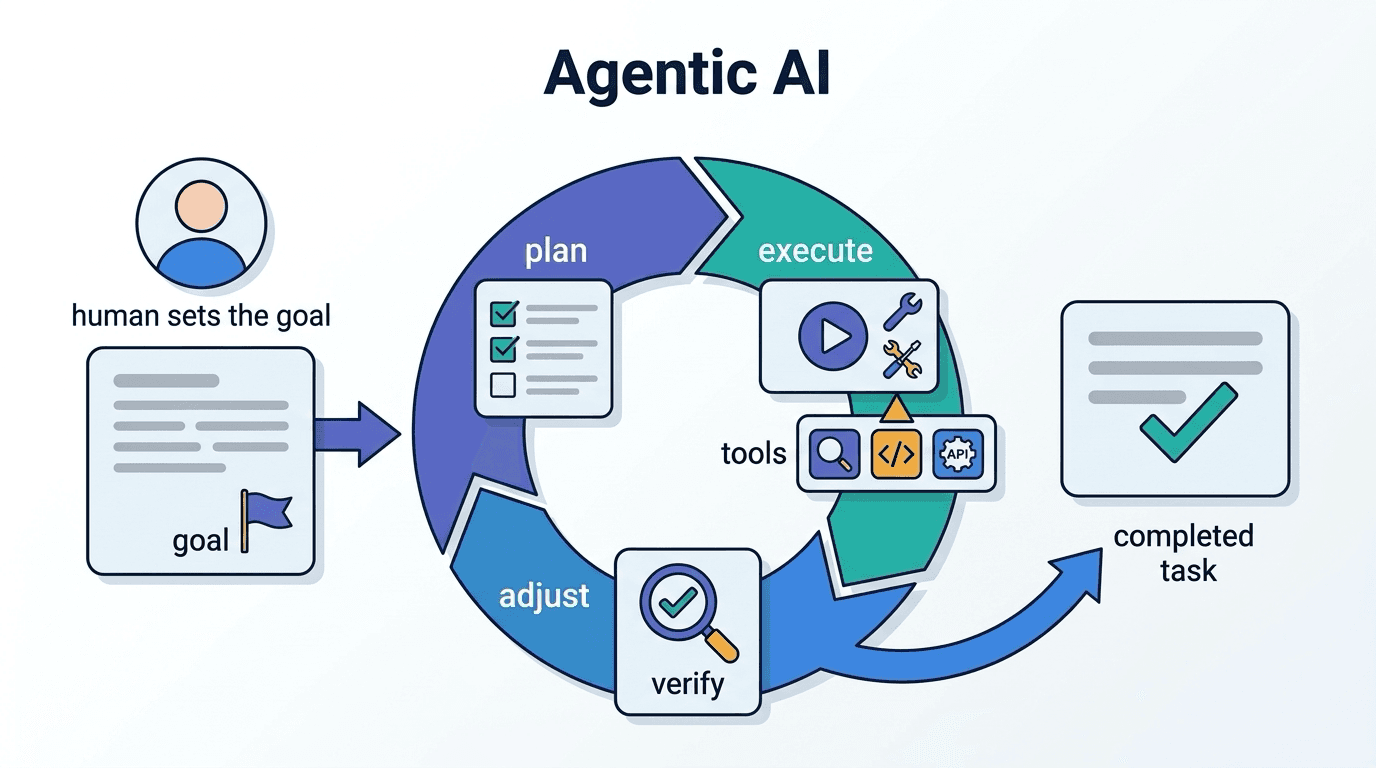
Agentic AI
Agentic AI is a general term for AI systems that interpret goals and autonomously repeat the cycle o
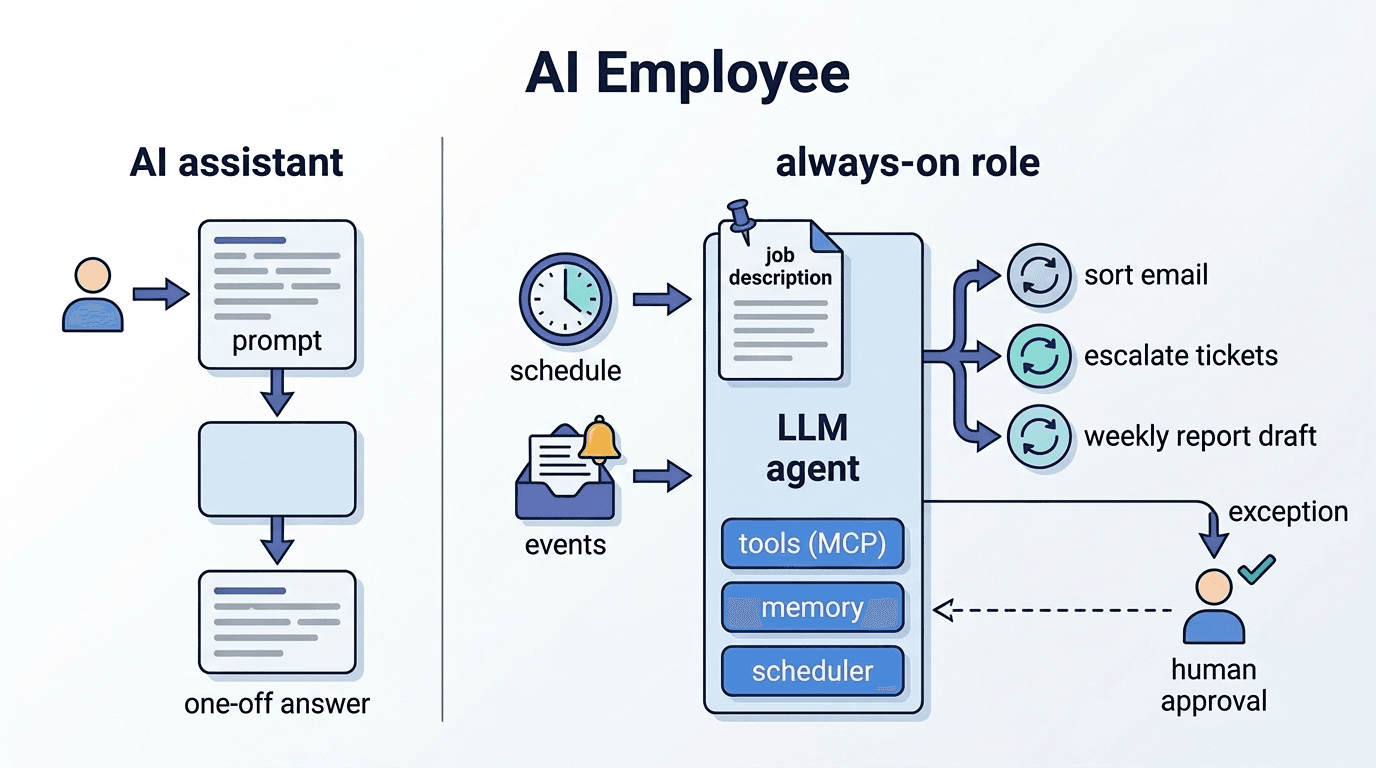
AI Employee (AI Employee)
An autonomous AI agent that takes on a specific business role and continuously performs tasks in the