**What is Cloudflare OS? Permission Design for Internal AI Agent Infrastructure and How Gatekeeper Works**

Introduction
Cloudflare OS is an open-source platform that gives every employee in a company an AI agent and a workspace to work in, allowing them to connect to core systems and delegate work while staying grounded in the company's own terminology and procedures. Cloudflare rebuilt the internal infrastructure it had been running in-house and released it on GitHub under the Apache License 2.0 on August 5, 2026 (Cloudflare official blog, accessed August 26, 2026).
To state the conclusion up front, this product's central claim boils down to one point: "the platform itself—rather than each individual app's implementer—takes on the responsibility for permission design when letting agents touch internal systems." However, since Cloudflare itself positions this as roughly equivalent to "early access," limited pilot testing is more realistic at this stage than a full company-wide rollout.
This article is aimed at IT department staff and DX promotion leads who have already started using AI internally but are stuck at the stage of "letting AI touch core systems." It organizes the substance of this permission design and the criteria for judging whether it's worth considering.
Cloudflare OS is not a standalone AI chat tool but a foundation that combines three elements—agent, security, and apps—into one. We'll walk through its components, how it differs from existing internal AI chat tools, and how it's actually being used inside Cloudflare.
Three Components of Cloudflare OS
The official blog describes Cloudflare OS as the combination of the following three elements. This breakdown forms the backbone of the rest of this article.
| Component | Role | Key point |
|---|---|---|
| Agent workspace | A place to research, create, and execute code based on the company's own context and skills | Works entirely in the browser and can be used even by non-developers |
| Security and governance framework | The layer that governs connections to internal data and internal services | The guarantee of who can see what is borne by the platform itself, not by each individual user |
| Modifiable app foundation | A mechanism for keeping deliverables as apps that can continue to be shared and modified | Each individual "file" becomes an independent app |
The key point is the third column, especially the second row's design of "borne by the platform itself"—this connects to the Gatekeeper and observation logs discussed later. The workspace itself bundles together conversations, saved state, deliverables, access rights to connected destinations, and an isolated environment where code can be written and executed.
How It Differs from Internal AI Chat
For companies that have already rolled out AI chat to their entire organization, Cloudflare OS's positioning may be hard to grasp. There are three key differences.
First, the agent has company context from the very start. Because terminology, procedures, and established internal ways of working are accumulated as instructions, the work of rewriting the same premise explanations for the model each time disappears.
Second, a path to reach core systems is provided from the outset. It includes a Gatekeeper (a per-service gatekeeper, discussed below) that provides access through controlled pathways, and existing MCP (Model Context Protocol) servers can also be connected via MCP Server Portals.
Third, there is a way to avoid calling the model every time. For much of routine work, only one or two points require judgment, with the rest being a sequence of fixed procedures. Cloudflare OS can convert such work into "near-deterministic workflows" that handle the predictable parts with code. Triggers can be chosen from manual invocation, scheduling, or events from connected systems.
How Cloudflare Uses It Internally
The numbers Cloudflare itself has published about its internal operations provide a basis for judgment. According to CIO Sam Rhea, thousands of employees use the platform weekly, and the number of daily users increases with each business day. The company estimates that in the past month alone, the sales team alone saved more than 10,000 hours of manual work, and over the same 30-day period, users created more than 4,000 apps and tools (Cloudflare CIO blog, accessed August 26, 2026). However, the 10,000-hour figure is explicitly labeled by the company as an "estimate," and the calculation method has not been disclosed.
How the platform is used varies by role. In sales, it has been applied to territory planning and proposal creation. The IT help desk example is more concrete. Rhea writes that his own daily routine—downloading a CSV every morning, creating graphs in spreadsheet software, and manually opening tickets one by one that had come in overnight—was replaced with an agent-generated dashboard and AI-drafted replies. In procurement, bottleneck diagnosis that previously required days of tracing through spreadsheets can now be done with a single report.
Numbers from the engineering side have also been shared. Over the past four months, the agent fleet flagged approximately 250,000 potential issues, blocked 16,000 merges, and detected structural problems in around 600 designs before any code was written.
Why Cloudflare Rebuilt Its Internal AI Platform

Cloudflare OS is not a product born from a desk-based design—it is the result of the company first operating it internally and rebuilding the parts that broke. The specifics of this process remain documented in an article by Rhea, published simultaneously.
It Started with "Give Me API Keys (Plural)"
Rhea has written down the moment when the problem became clear. About six months before the article's publication, a member of the sales organization came asking, "Give me API keys. Multiple ones." They were building a "SuperApp" to transform the go-to-market team with AI, and what they needed was simply production access and deployment permissions to a dozen or so core systems.
The same request can happen at any company once internal AI adoption enters its next phase. Once business units become able to build apps on their own, the next thing they need is access to internal systems. However, an operation of handing out API keys becomes unsustainable as the number of people grows. This is because keys often have broad scope and long validity periods, making it difficult to restrict permissions, share them safely, or track who used what for what purpose.
The same structural issue is pointed out in official documents as well. OWASP's Top 10 for LLM Applications (2025 edition), LLM06 "Excessive Agency," cites as an example a situation where an extension intended only for reading connects with an ID that can also execute UPDATE or DELETE operations, and states that authorization should be implemented on the downstream system side, not the LLM ("OWASP Top 10 for LLM Applications 2025", accessed August 26, 2026). Note that the Ministry of Internal Affairs and Communications' Guidelines on Technical Measures for Ensuring AI Security (March, Reiwa 8) explicitly excludes AI agents from its scope, meaning there is still no public standard in Japan that must be complied with.
Three Things That Broke in Version 1, and the Organizational Failure
The first version was distributed to all employees in May 2026. Even so, it was rebuilt because limitations became apparent through actual operation.
There were three technical limitations. First, apps remained static outputs rather than "working software" connected to internal systems. Second, inference ran every single time even for deterministic tasks, wasting thousands of tokens each morning regenerating nearly identical daily reports. And the most fundamental issue was one that surfaced when sharing began: access rights to an MCP server tell you "which tools can be called," but not "which resources were actually viewed." The MCP specification does not mandate authorization and explicitly states that permission enforcement is not performed at the protocol layer (official MCP specification, accessed August 26, 2026). It also does not include a framework for tracking observed resources tied to deliverables. The moment workspaces or outputs began being shared, a pathway emerged through which information that should not be shown could reach people via those deliverables.
The organizational failures are also stated candidly. Rhea's own assessment is that it was an early mistake to hand non-engineers engineer-oriented tools with only the UI made more approachable—giving everyone a tool skilled at generating code simply produced more code than necessary. So the company instead provided a "magic AI email bot" where you send in work you don't want to do and get results back, while behind the scenes a small team handled things manually with AI. Rhea looks back on this as "miserable," but says that through hundreds to thousands of sessions, they were able to identify the routine tasks that should be automated. Note that the official article does not state that an actual information leak occurred with the first version.
Permission Design for Letting Agents Touch Internal Systems

The core of Cloudflare OS lies not in the chat experience but in the design of authorization. It is a form of enforcing, at the platform level, the thinking addressed in the implementation guide on designing AI agent tool-execution permissions with Least Privilege.
Access Starts at Zero by Default
Cloudflare Access manages the entry point, controlling who can enter Cloudflare OS. Inside it, every agent and app starts in a state with no access to anything, and the flow is one where an agent requests access to a specific resource and a human either grants or denies it.
Granted resources are passed into generated code as typed bindings. The following is an example from the official blog—what's worth noting is that no credentials appear anywhere in the code.
1const issues = await env.PROJECT.listIssues({
2teamId: "ENG",
3state: "open",
4});
env.PROJECT is a "capability"—it represents the very authority to use a specific resource under a defined policy. Credentials, according to the official explanation, are isolated from both the agent and the generated code.
The execution environment is also closed off. Server-side code runs in an execution unit (Dynamic Worker) with outbound communication disabled, while client-side code runs in an isolated frame within the browser. The design is said to prevent reaching the internet except through explicitly granted capabilities. All of this is based on the vendor's own explanation, so its effectiveness in your own environment should be verified and evaluated independently.
Gatekeeper Acts as a Gatekeeper for Each Service
Gatekeeper is a small program dedicated to a specific service, standing between the Cloudflare OS and external services. It relays requests after grasping the target service's API, the resources it can handle, and the operations it can perform.
Granting access to an entire GitHub account is too broad for most use cases. By interposing a Gatekeeper, you can limit the scope to a single repository, allow reading issues but not source code, hide specific fields, apply rate limits, and require human approval before merging pull requests. All the agent sees is a small TypeScript API; OAuth handling, credential retention, and policy enforcement are all completed on the Gatekeeper's side.
This isn't abstract theory. The core repository comes bundled with 16 Gatekeepers, including GitHub, Google, Slack, Notion, Supabase, Linear, email, and MCP (see cloudflare/cloudflare-os, accessed August 26, 2026).
What matters operationally is that human approval is asynchronous. When an operation requiring approval is reached, the Gatekeeper returns a simulated result locally to let the agent proceed, accumulating pending approvals. This design avoids a bottleneck where the entire process halts for each individual approval.
"What the Agent Saw" Determines Sharing Scope
Controlling the initial read alone isn't enough—this is the biggest lesson learned from the first version. Suppose an agent reads a sensitive table and creates a dashboard based on it. Sharing that dashboard must not become a means of passing its contents to someone who couldn't view the original table.
To address this, Cloudflare OS records every resource an agent has observed. These records remain tied to the resulting artifact, so when another person opens the workspace, interacts with it, or tries to view the generated output, the Gatekeeper verifies that person's own permissions against the observed resources. It's the viewer's permissions—not the creator's—that take effect. The same records are also used in decisions about outbound communication, where the fact that sensitive data was read can serve as grounds for blocking external writes.
The key point comes down to whether controls remain effective "after sharing."
| Aspect | Passing API keys directly | Via MCP server | Gatekeeper + observation records |
|---|---|---|---|
| Granularity of permissions | Key-level. Broad and long-lived | Can be restricted per tool | Can be narrowed down to resource, operation, and field level |
| Awareness of "what was viewed" | Cannot be tracked | Know which tools can be called, but not what was observed | Observed resources are recorded and retained |
| Re-verification upon sharing | None | None | Re-verified using the viewer's own permissions |
| Suppression of external transmission | Depends on the user's implementation | Depends on the user's implementation | The platform itself decides based on observation history |
For where MCP fits in, see What Is the Difference Between MCP and A2A? Comparing and Choosing AI Agent Protocols.
How Conversations Become Apps and Workflows

In Cloudflare OS, each individual "file" becomes its own independent app, one that both its creator and its recipients can later rebuild. Here we cover the key points of this implementation and how to choose between sharing methods.
Every App Runs as a Worker
When an agent is asked to build an app, it writes two things: client-side code that renders the screen, and server-side code that stores state and implements behavior. The server side launches as an independent execution unit for each app and has its own dedicated database for that app—a structure that keeps it separate from the Cloudflare OS core's own data.
What matters for judgment is that this separation is achieved "without adding more standing servers." Because lightweight execution units are used, even if employees spin up thousands of apps on a whim, there's no need to provision dedicated servers or containers.
Choosing Between Sharing and Blueprints
Apps created this way are private by default and can be shared much like documents. There are two sharing methods, and for spreading an app to other departments, the blueprint approach below is generally recommended.
| Sharing method | What the recipient gets | What is not carried over | Best suited for |
|---|---|---|---|
| Sharing the app itself | Real-time collaboration using the same state | —— (state is shared) | Multiple people working on the same case |
| Sharing a blueprint | A personal copy using the original app's code | Data, conversation history, credentials, connected resources | Each person handling the same type of work with their own data |
When distributed as a blueprint, the recipient starts the app from an independent state and set of resources, meaning the original data and connections are not carried along with it. Rather than filing a feature request and waiting on the creator, the recipient can modify it themselves with AI on their own end.
Deterministic workflows follow the same logic. Since the model is only invoked where judgment is needed, tokens aren't consumed on every execution. Regarding a ticket dashboard he built himself in the second version, Rhea writes that "the number of tokens consumed every time I load the initial report is exactly zero."
Decision Criteria for Considering In-House Adoption

Cloudflare OS is released under the Apache License 2.0, and can be deployed to your own Cloudflare account to run with your own Access policies, AI Gateway settings, data, and integrations. However, there are constraints around prerequisites and maturity, so let's start by confirming those.
Prerequisites, and Which Companies Are a Good Fit
The starter repository's README lists Workers, KV, R2, Browser Rendering, and Dynamic Worker Loaders as required account features, and also requires Workers AI and AI Gateway if you use the default model catalog. Production deployment instructions are consolidated into a single README (cloudflare/cloudflare-os-starter, accessed August 26, 2026).
Maturity requires attention. The core README explicitly states that v2 is equivalent to "early access" with many rough edges remaining, and it does not actively solicit external contributions (only clear bug fixes within a dozen or so lines are accepted).
There are four key decision criteria:
| Decision criterion | Well-suited | Requires careful judgment |
|---|---|---|
| Infrastructure prerequisites | Already operating Workers or Zero Trust on Cloudflare | Not using Cloudflare and starting with a new contract |
| Tolerance for maturity level | Have a team structure to fill in rough edges yourselves | Need a finished product with SLA and support contact |
| In-house capability | Have members on staff who can read TypeScript and Workers | Want to entrust all operations to an external party |
| Purpose | Want to shift permission design for internal system connections to the platform side | Primary goal is promoting general-purpose chat usage |
The Layer That Controls Model Selection and Cost
Cloudflare OS is not tied to any specific model. Since all inference calls pass through Cloudflare AI Gateway, you can decide in one place which models to make available and which model handles which task. AI Gateway supports multiple providers, including Workers AI, Amazon Bedrock, Anthropic, Azure OpenAI, Google Vertex AI, and OpenAI. Requests are logged tied to the person, team, or workspace that executed them, so administrators can trace the source of costs and set budgets and rate limits.
Rhea explains the necessity with an analogy: "You can't let someone spend $20 to summarize an email inbox every hour." That's why models available are restricted by role, and highly autonomous use cases like scheduled execution are steered toward more efficient models. The structure that makes costs hard to predict is also organized in What Is the Token Trap? Practical Consumption Management to Prevent Hidden AI Agent Cost Explosions.
Where to Start Testing
If you just want to get a feel for it, running it locally is the fastest way. Install pnpm, run pnpm run-local, and open http://localhost:8787 to get it working (not for production use).
For internal validation, it's realistic to narrow the scope. As a hypothetical example, the following three stages should be manageable. First, choose a single read-only task that generates no writes, such as "reading only the issues of a specific repository to create a weekly summary." Next, enable only the Gatekeeper needed for that task, and verify that the restrictions on target resources, readable fields, and rate limits work as intended. Finally, share the output with a third party who has different permissions, and test whether it's blocked based on that viewer's own permissions.
The third stage is the most important. The differentiating factor is re-validation at the time of sharing, and whether this meshes with your organization's permission structure is where judgment diverges.
Alongside technical validation, you'll also want to decide on where responsibility lies. As internal principles, Cloudflare has explicitly stated that "humans bear responsibility for output" and "using AI must not increase permissions to core systems," stipulating that the person who deployed the agent is responsible for its output, and that administrators take over upon that person's departure. This is the kind of thing that internal audits and information security committees ask about before technical specifications. For guidance on designing oversight structures, see AI Agent Governance Framework Building Guide.
Frequently Asked Questions About Cloudflare OS

Here we answer three points: whether it can run outside a Cloudflare account, how to handle existing MCP assets, and timing for adoption.
Can Cloudflare OS Run on Our Own Servers?
Officially, it is described as "possible," but the procedures are not yet fully established. The README states that, because worker'd—the Workers runtime—is open source, it is not necessarily the case that it can only run on Cloudflare. However, that section is marked "COMING SOON," and neither documentation nor tooling has been prepared yet. Given the dependencies on each feature listed in the prerequisites section, the only reliable path at present is deployment to your own Cloudflare account.
Can Cloudflare OS Use Existing MCP Servers?
Yes, it can be used. There are two routes. In the user-driven approach, when you paste the URL of any MCP server, Gatekeeper performs OAuth discovery and converts each tool into typed methods within the session. In the organization-driven approach, an administrator configures a single portal URL, and everyone accesses all MCP servers approved by the organization through it. The intended deployment target for the latter is Cloudflare's MCP Server Portals, where Access determines whether a connection is permitted and Gateway logs and inspects the communication. If the goal is to consolidate MCP connections scattered across the company into a single audit point, the latter approach aligns with the design intent.
Should We Roll Out Cloudflare OS Company-Wide Right Now?
There is reason to wait—that is the answer at this point in time. Among Cloudflare's future plans are offering the product as a fully managed service on the Cloudflare dashboard, adding containers for development workflows, and workspace integrations with tools such as Slack. The fully managed version in particular would change the calculus for companies currently in the "not suited for" category.
On the other hand, for companies already running Cloudflare in production, where internal AI adoption is stalled on the question of "how to grant permissions for system connections," it is worth evaluating now. At the time of this investigation, there are not many examples where an implementation—permission design included—is published in its entirety.
Summary

What Cloudflare OS addresses is not "how to make AI smarter," but the operational question of "when letting an agent touch internal systems, can you guarantee who can see what." There are four key points:
- Agents and apps start with zero access by default, and credentials are isolated from code
- Gatekeeper narrows permissions down to the level of resources, operations, and fields, and can insert asynchronous approval
- It records the resources an agent has observed, and re-validates against the viewer's own permissions at the time of sharing
- It is released under the Apache License 2.0 and can be run on your own Cloudflare account, but is officially at an early-access-equivalent stage
Rather than leaving permission design to each app's implementer, this approach takes it on as a responsibility of the platform itself. Regardless of whether you adopt it, this idea serves as a benchmark for evaluating internal AI platforms. As a first step, check within your own organization whether "what an agent has seen can be re-validated at the point of sharing."
Our company provides support for implementing AI agents in business operations, including permission and governance design. Please feel free to consult with us, starting from organizing how to connect internal systems with AI.
Author & Supervisor

Yusuke Ishihara
Started programming at age 13 with MSX. After graduating from Musashi University, worked on large-scale system development including airline core systems and Japan's first Windows server hosting/VPS infrastructure. Co-founded Site Engine Inc. in 2008. Founded Unimon Inc. in 2010 and Enison Inc. in 2025, leading development of business systems, NLP, and platform solutions. Currently focuses on product development and AI/DX initiatives leveraging generative AI and large language models (LLMs).
Recommended Articles


Terms related to this article
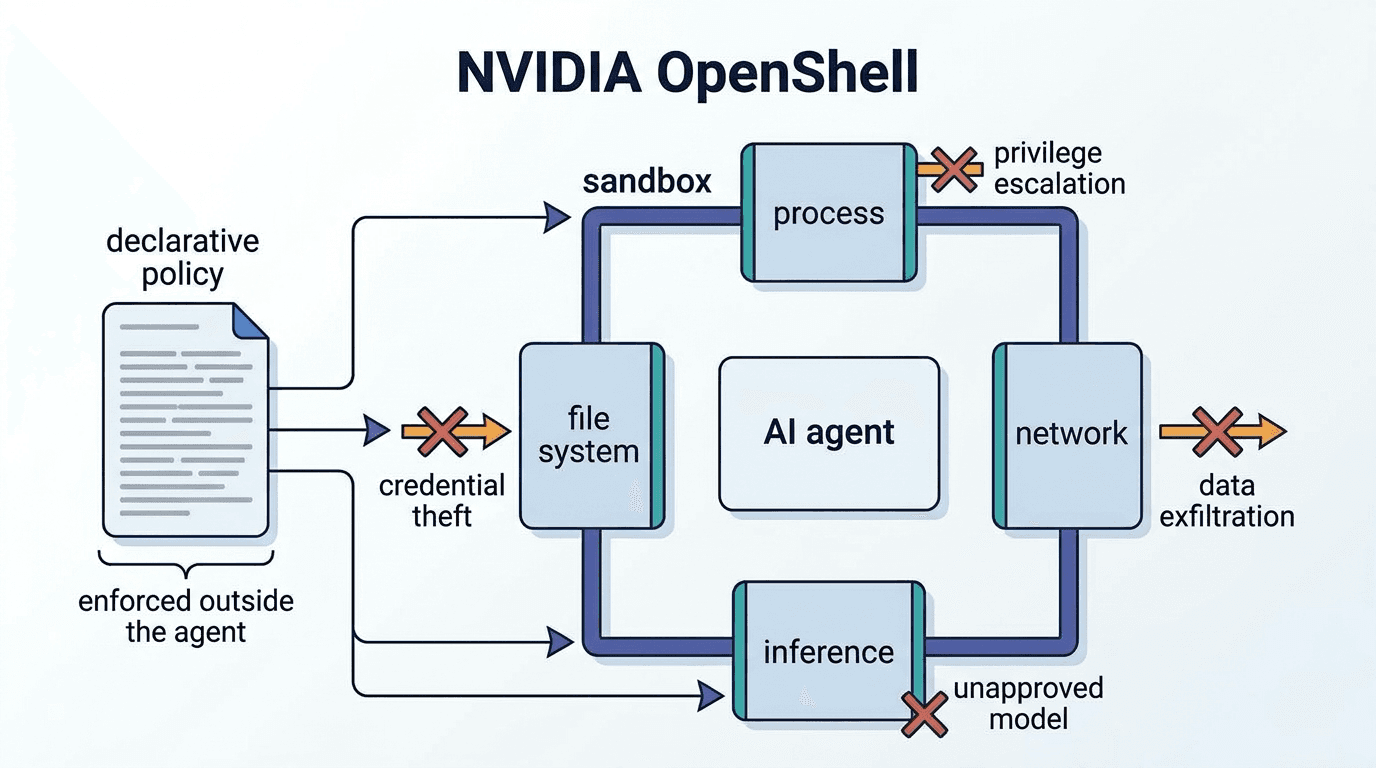
NVIDIA OpenShell
NVIDIA OpenShell is an open-source runtime environment that isolates AI agents within a sandbox and
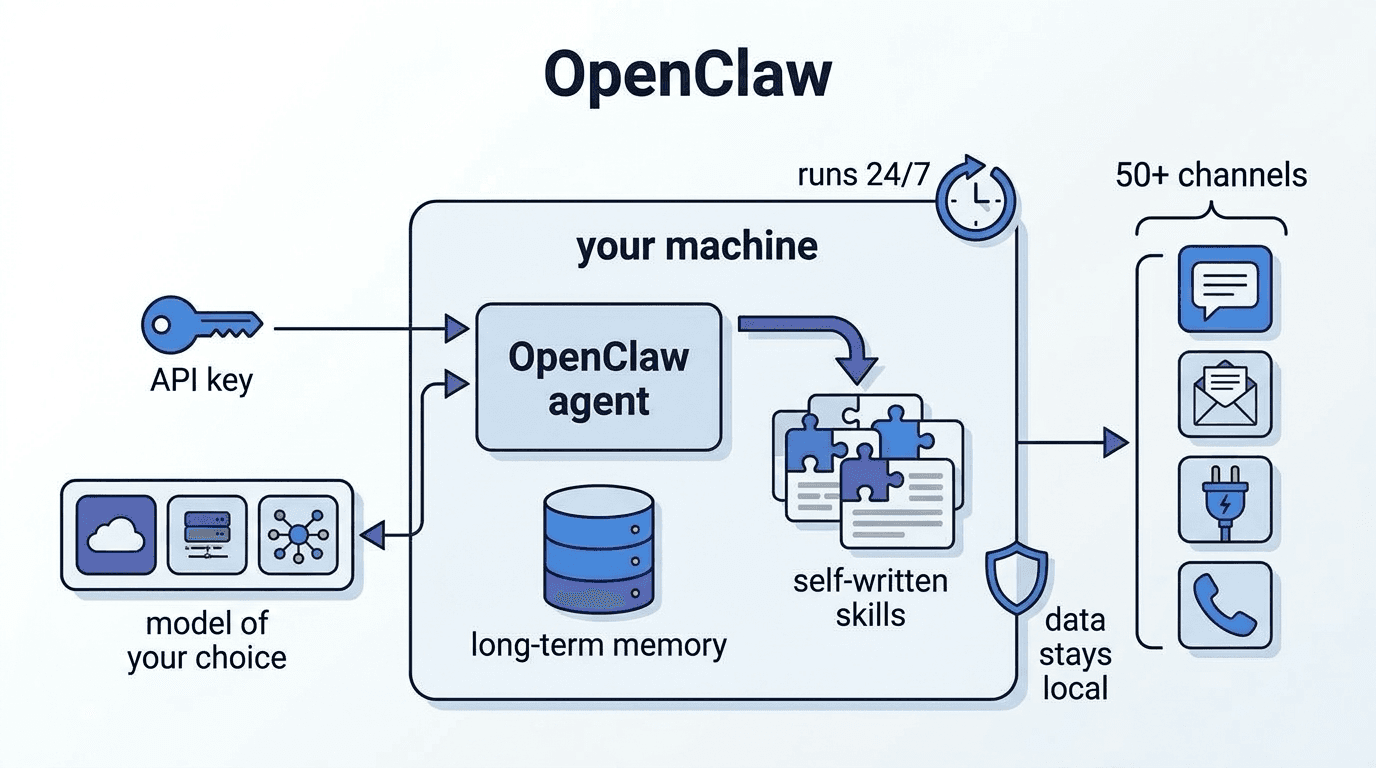
OpenClaw
OpenClaw is an open-source personal AI agent framework that runs in a local environment, featuring l
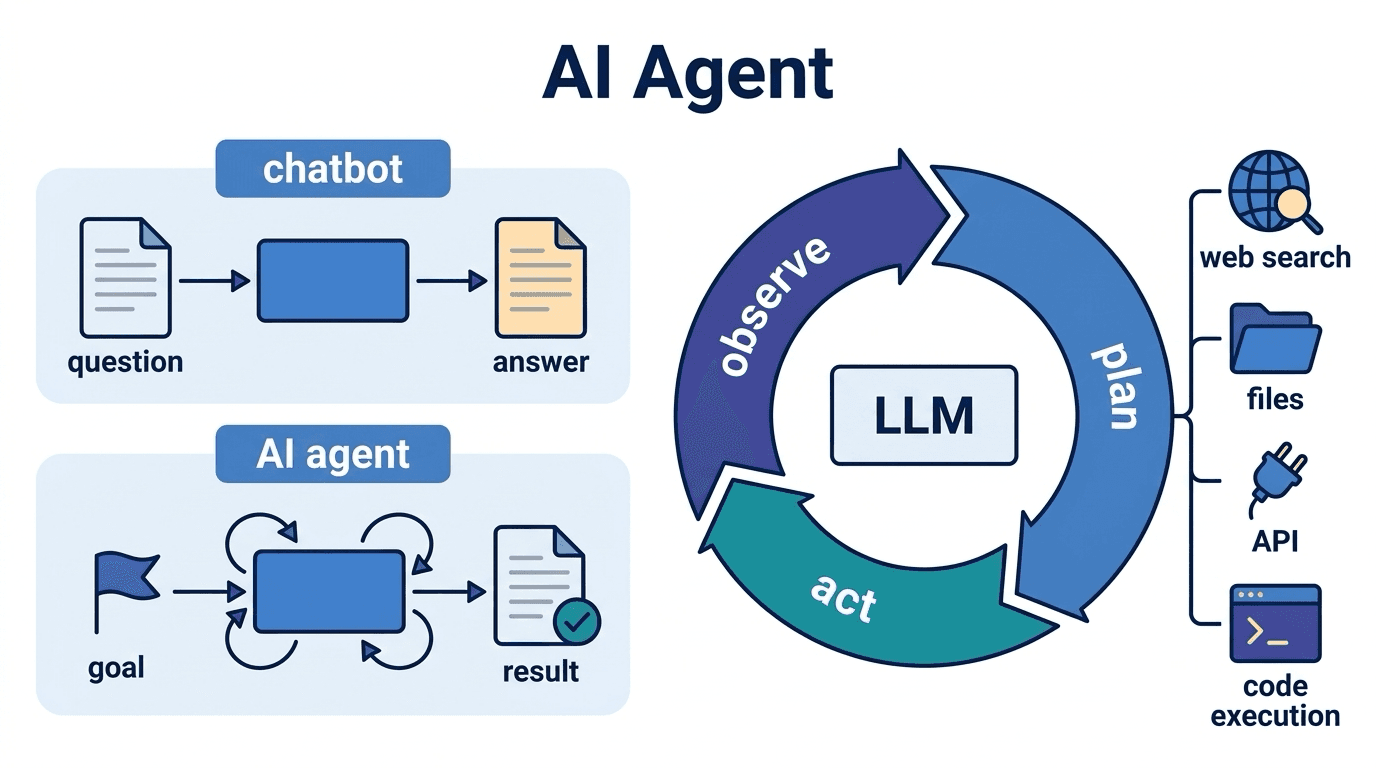
AI Agent
An AI agent is an AI system that autonomously formulates plans toward given goals and executes tasks