Practical Guide to AI Coding Agents — How Claude Code vs Codex Will Transform Your Development Team

Claude Code excels at interactive real-time collaboration, while Codex excels at cloud-delegated autonomous execution. After six months of real-world use of both tools within our development team, we reached the conclusion that matching the right tool to the appropriate task granularity maximizes productivity. This article provides five comparison axes, empirical measurement data, and an adoption decision flowchart to help tech leads and engineering managers select the tool best suited to their team's development style.
What Are AI Coding Agents? — The Decisive Difference from Completion Tools

Inline completion tools like GitHub Copilot predict the "next few lines" of code a developer is writing. AI coding agents, on the other hand, comprehend an entire repository as context and consistently carry out tasks ranging from file creation and editing to test execution and Git operations. These tools represent a turning point where the developer's role shifts from "someone who writes code" to "someone who communicates intent and reviews results."
From Code Completion to "Agents": An Evolution
Traditional code completion was a one-directional form of assistance: "context at cursor position → predict the next few lines." Agents fundamentally change this. They have the ability to read project structure, track dependencies, run tests, and self-evaluate results——in other words, to take ownership of an "entire development task."
The case of Spotify introducing an AI coding agent internally, where 75% of developers reported an improvement in coding speed, clearly illustrates the impact of this evolution. However, the point that speed improvements do not necessarily translate to quality improvements will be examined with empirical data later in this article.
Three Agent Types — Inline Completion / Conversational / Autonomous Execution
AI coding assistance tools are divided into three categories based on their level of intervention.
| Category | Operational Model | Representative Examples | Developer Involvement |
|---|---|---|---|
| Inline Completion | Predicts the next line at cursor position | GitHub Copilot, Codeium | High (line-by-line review) |
| Interactive Agent | Implements features through real-time interaction in terminal/IDE | Claude Code, Cursor | Medium (convey intent and make corrections as needed) |
| Autonomous Execution Agent | Delegates tasks to the cloud and receives results upon completion | Codex, Devin | Low (review after completion) |
In this article, we examine Claude Code as a representative of the "interactive" category and Codex as a representative of the "autonomous execution" category, and explore how to use each effectively in practice.
Basis for Comparison — What and How to Compare

The most common mistake in tool comparisons is listing the number of features and concluding that "more is better." In reality, the optimal tool varies depending on the team's development style, the nature of the tasks, and security requirements. Here, we outline five axes that form the basis of comparison, along with clearly defined team profiles to serve as reference points.
Comparison Axes of This Article (5 Axes)
- Execution Model — Local interactive vs. cloud autonomous
- Context Understanding — Repository-wide comprehension capabilities and constraints
- Development Workflow Integration — Connections with Git operations, CI/CD, and review processes
- Security & Governance — Code submission destinations, sandboxing, and audit logs
- Cost Structure — Pricing models and ROI calculation methods
Assumed Team Size and Development Style
The evaluation in this article assumes a team with the following profile:
- Size: Development team of 3–20 people
- Stack: Web application development centered on TypeScript / Python
- Workflow: GitHub-based PR reviews, with a CI/CD pipeline in place
- Security: Certain restrictions on external transmission of code, due to handling of customer data
While the basic decision-making criteria remain the same for a two-person startup or an enterprise of 50+, note that the weight given to governance requirements will differ.
Claude Code vs Codex — Feature Comparison Table

The comparison table below provides a high-level overview; subsequent sections will dive deeper into the strengths and weaknesses of each tool.
| Comparison Axis | Claude Code | Codex |
|---|---|---|
| Execution Environment | Local terminal / IDE extension | Cloud sandbox (Docker container) |
| Interaction Model | Real-time interaction. Direction can be changed mid-task | Asynchronous model where you submit a task and wait for completion |
| Context Scope | Entire project + persistent instructions via CLAUDE.md | Entire repository. Instructions persisted via AGENTS.md |
| Git Operations | End-to-end execution: branch creation, commits, and PR creation | Automatic branch creation and PR draft generation |
| Test Execution | Runs directly in the local environment | Automatically executed inside the sandbox (network-isolated) |
| Parallel Tasks | Basically one task per session | Multiple tasks processed in parallel simultaneously in the cloud |
| Security | Code stays local. API communication only | Code is uploaded to the cloud |
| IDE Integration | VS Code extension, JetBrains, Xcode support | ChatGPT in-app UI, GitHub integration, CLI |
| Customization | CLAUDE.md + hooks + MCP server | AGENTS.md + sandbox configuration |
| Pricing | Pay-as-you-go API or subscription (Max plan) | Included in ChatGPT Pro / Team plans |
Strengths and Weaknesses of Claude Code — Interactive Real-Time Collaboration

The first tool our company fully adopted was Claude Code. The reason was simple: it best matched the development team's need to "discuss design decisions while translating them into code."
Strengths — Context Retention and Iterative Design Dialogue
Claude Code's greatest strength lies in its ability to advance implementation while "conversing" with the developer.
Grasping the entire project: By describing the project's conventions, architecture, and naming rules in a CLAUDE.md file, they are automatically loaded at the start of each session. Rules such as "this project always uses Supabase RLS" or "tenant isolation is handled with .eq("tenant_id", tenantId)" can be embedded in advance, eliminating the need to repeat instructions every time.
Incremental course correction: Even if you change direction mid-implementation—say, "actually, let's make this API a Server Action instead of REST"—you can make the adjustment while retaining the context built up to that point. In cases where autonomous execution tools would require starting over after task completion, a conversational approach allows for mid-course corrections.
Toolchain integration: By connecting an MCP (Model Context Protocol) server, you can directly execute operations such as Supabase table manipulation, browser testing with Playwright, and external API calls through the agent. At our company, we connect Supabase MCP to handle everything from migration application to type generation entirely within Claude Code.
Weakness — Not suited for large volumes of routine tasks
Due to its interactive nature, developers need to stay attached to the session. If you want to handle 10 bug fixes in parallel, Claude Code requires you to address them one at a time sequentially, or manage multiple open terminals. In this regard, it is clearly inferior to Codex's parallel execution model.
Additionally, since there is no network-isolated sandbox, developers must manage the scope of impact of commands executed by the agent themselves. Control is possible through permission settings (--allowedTools and hooks), but setup requires considerable effort.
Use Cases at Our Company
Our company uses Claude Code for the following tasks.
- New feature design and implementation: Translating requirements into code through iterative dialogue
- Existing code refactoring: Progressing incrementally while checking the impact of changes
- DB migrations: Executing schema changes, type generation, and testing end-to-end via Supabase MCP
- Code review support: Loading PR diffs and reviewing from security and performance perspectives
The task where the author felt the greatest impact was refactoring. When changing select("*") to explicitly specified columns, simply telling Claude Code to "check the schema for this table and include only the fields referenced in Client Components in the select" was enough for it to check the schema via MCP, trace references using Grep, and safely complete the refactoring. A task that would have taken 30 minutes by hand was finished in 5 minutes.
Strengths and Weaknesses of Codex — Cloud-Delegated Autonomous Execution

Codex is an autonomous coding agent provided by OpenAI. It differs fundamentally from Claude Code in its design philosophy, adopting a cloud delegation model where you "hand off a task and simply receive the result."
Strengths — Parallel Task Execution and Sandbox Environment
Codex's greatest strength is parallel processing. Because multiple tasks can be executed simultaneously in cloud sandboxes, use cases such as "running 5 test fixes at the same time" or "progressing multiple bug fixes in parallel" become possible.
Sandbox security: Each task runs inside a Docker container isolated from the network. Even if the agent executes an incorrect command, it will not affect production or development environments. For teams that prioritize security audits, this isolation provides significant peace of mind.
Deep GitHub integration: When tasks are assigned directly to a repository, Codex automatically creates a branch, implements the changes, runs tests, and opens a draft PR. Reviewers only need to check the completed PR.
Apple's integration of coding agent functionality into Xcode is accelerating the trend toward IDE-integrated agents becoming mainstream. Codex also offers a CLI and API in addition to the ChatGPT UI, broadening the options for embedding it into workflows.
Weakness — Slow Feedback Loops
The fundamental weakness of autonomous execution is that mid-task course corrections are not possible. Once a task is handed off, you have no choice but to wait for completion, and when the result comes back as "80% correct but slightly off in direction," the rework cost becomes significant.
We have a real example of this happening at our company. When we submitted the task "Add authentication checks to the API endpoints," Codex implemented authentication at the middleware level. However, since our architecture was designed to call auth.getUser() within Server Actions, the generated code required a complete rewrite. With Claude Code, we could have made a mid-course correction along the lines of "not in middleware, but inside the Server Action."
Additionally, because it operates in a network-isolated environment, tasks that require connections to external APIs or databases need additional configuration. For tasks that integrate with a local Supabase instance or external services, Claude Code is far easier to work with.
Use Cases at Our Company
At our company, we use Codex for the following tasks.
- Routine bug fixes: Passing error logs and stack traces and asking it to "fix this"
- Adding and updating tests: Generating unit tests for existing code Documentation generation: Automatic generation of API documentation from the codebase
- Lint and formatting fixes: Batch correction of style violations
All of these share a common trait: they are tasks where "the correct answer is clear and there is little ambiguity in approach."
Our Actual Measurement Data — How Feature Implementation Speed and Review Defect Rate Changed

The most persuasive factor in tool selection is empirical data. I will share the results from running both tools with our development team.
Verification Environment and Measurement Methods
- Target Project: Next.js + Supabase admin dashboard application (TypeScript)
- Team Composition: 4 engineers (2 senior + 2 mid-level)
- Measurement Period: 2 months of operation per tool as the primary tool
- Measurement Metrics: ① Average time required for feature implementation (until PR merge) ② Number of review comments per PR ③ CI test pass rate (on first push)
Before / After (Numerical Comparison)
| Metric | Without Tools | Claude Code Primary | Codex Primary | Combined (Current) |
|---|---|---|---|---|
| Feature implementation speed (medium-sized PR) | Avg. 6.2 hours | Avg. 2.8 hours (55% reduction) | Avg. 3.4 hours (45% reduction) | Avg. 2.1 hours (66% reduction) |
| Review comments per PR | Avg. 4.3 | Avg. 2.1 (51% reduction) | Avg. 3.8 (12% reduction) | Avg. 1.8 (58% reduction) |
| CI first-pass rate | 68% | 82% | 74% | 87% |
| Routine bug fixes (small-scale) | Avg. 1.5 hours | Avg. 0.8 hours | Avg. 0.4 hours | Avg. 0.4 hours |
What stands out is that Claude Code and Codex have clearly distinct areas of strength. Claude Code is overwhelmingly faster on medium-sized tasks involving design decisions, and generates fewer review comments. Codex, on the other hand, can process routine small-scale tasks in parallel, making it faster than Claude Code when it comes to bug fixes.
There is another interesting finding. PRs produced with Claude Code showed greater consistency in naming conventions and error handling patterns, since the agent references the project's conventions (CLAUDE.md) during implementation—meaning review comments tended to focus on "design decisions." With Codex, while code quality was high, the majority of review comments concerned deviations from project-specific conventions.
Establishing Rules for Proper Usage
Based on the measured data, our team settled on the following operational rules.
Tasks that use Claude Code:
- New feature design and implementation (when requirements are ambiguous or design decisions are needed)
- Refactoring (when the scope of impact needs to be assessed)
- Work involving DB schema changes
- Code review support
Tasks that use Codex:
- Clear bug fixes (when error logs and reproduction steps are available)
- Adding tests (comprehensive test generation for existing code)
- Generating documentation and type definitions
- Parallel processing of multiple independent small tasks
The decision criterion is "whether there is a possibility of changing direction midway" — this turned out to be the simplest and most practical branching condition.
Selection Flowchart by Purpose and Team

Based on the comparisons and measured data so far, we present selection guidelines tailored to each team's situation.
Criteria for Dividing by Task Granularity
Receive task
├─ Are requirements ambiguous or design decisions needed?
│ └─ YES → Claude Code (implement while clarifying requirements through dialogue)
│ └─ NO ↓
├─ Is the correct answer clear and formulaic?
│ └─ YES → Codex (hand it off and wait for results)
│ └─ NO ↓
└─ Is there a possibility of changing direction midway?
└─ YES → Claude Code
└─ NO → Codex
Recommended Configurations by Team Size
| Team Size | Recommended Setup | Reason |
|---|---|---|
| 1–3 members | Claude Code-centric | Low interaction cost; one person can handle everything from design to implementation |
| 4–10 members | Combined (differentiated by task granularity) | Claude Code for design tasks, Codex for routine tasks processed in parallel |
| 10+ members | Codex-centric + Claude Code used by lead engineers | Standardization and parallelization of tasks are key to scalability |
Examples of Combined Usage Patterns
Here is a concrete illustration of our current workflow.
- Tech lead handles design and prototyping with Claude Code (refining requirements through dialogue)
- Once the design is finalized, rules are reflected in CLAUDE.md / AGENTS.md
- Routine implementation tasks are delegated to Codex in parallel (adding tests, fixing bugs, generating documentation)
- PR reviews are supported by Claude Code (from a security and architecture perspective)
This flow establishes a division of labor in which the tech lead focuses on design decisions while routine tasks are delegated to the cloud.
Common Implementation Failures and Workarounds

We share the failures our company experienced when introducing AI coding agents, as well as anti-patterns observed from other companies' cases.
Failure 1 — Trying to Consolidate All Tasks into One Tool
"Let's do everything with Claude Code alone" or "Let's leave everything to Codex" — both approaches will fail. As the empirical data mentioned above shows, each tool has clear strengths and weaknesses. At our company, we concentrated all tasks on Claude Code for the first month, but efficiency in routine bug fixes never improved, and we ultimately transitioned to using both tools in combination.
Workaround: Start by trialing both tools for two weeks, measuring the time required for each task type. Establish usage rules based on the data.
Failure 2 — Deploying Agent Output to Production Without Review
Agent-generated code should be treated the same as "code written by a competent junior engineer." It can write working code, but it doesn't necessarily have a complete understanding of project-specific constraints (tenant isolation, RLS policies, error handling conventions).
In an actual case at our company, a Supabase query generated by Codex was missing a tenant filter (.eq("tenant_id", tenantId)). The tests passed, but in production it was a serious issue that could lead to data leakage between tenants.
Mitigation: Explicitly document security rules in CLAUDE.md / AGENTS.md. Incorporate static analysis into CI (e.g., checking for the presence of tenant filters). Always have a human perform PR reviews.
Failure 3 — Lack of Security Policy Development
Security teams often raise concerns about sending source code to cloud-based tools. The worst-case scenario is being told "actually, we can't use this" after deployment.
Workaround: Reach agreement with the security team on the following points before deployment.
- Destination of code transmission and data retention policies (Claude Code: API communication only, code stays local. Codex: uploaded to the cloud)
- Network isolation level of the sandbox
- How to obtain audit logs
- Exclusion settings for sensitive information (
.env, credentials)
FAQ

Q1: Can Claude Code and Codex be used together?
We actually use both tools in combination at our company, and we find that dividing their use according to task granularity yields the highest productivity. The basic division of labor is to use Claude Code for tasks requiring design decisions, and Codex for routine tasks. By writing team-wide rules in each tool's project configuration files (CLAUDE.md and AGENTS.md), consistent code can be generated regardless of which tool is used.
Q2: How should this be used alongside the existing GitHub Copilot?
GitHub Copilot is an inline completion tool and plays a different role from an agent. Copilot excels at rapidly suggesting "the next few lines of code you're currently writing," making it effective for boosting typing speed. Claude Code / Codex are agents that take on "entire tasks." In practice, quite a few teams use all three in combination — a three-tier structure where Copilot handles everyday coding, Claude Code handles tasks that involve design, and Codex handles batch processing of routine tasks.
Q3: Are there any security concerns with agents?
There are two main concerns: ① external transmission of code (particularly with cloud-execution types), and ② the security quality of code generated by agents. Regarding ①, Claude Code is designed to keep code local and only communicate via API, making it lower risk than Codex (which uploads to the cloud). Regarding ②, both tools have the potential to generate code containing OWASP Top 10-level vulnerabilities. Static analysis in CI and human review remain essential.
Q4: Can small teams (3 or fewer members) still benefit from implementation?
Rather, smaller teams tend to find it easier to feel the benefits. Since each engineer covers a wider range of responsibilities, the productivity gains from agents have a more direct impact. In our experience, when we introduced Claude Code to a three-person team, we were able to bring front-end implementation in-house that had previously been outsourced, reducing outsourcing costs by approximately 40% per month.
Summary — The Optimal Approach Is to Choose Based on Task Granularity

Claude Code and Codex are not competitors but complementary tools.
- Claude Code → Tasks involving design decisions, tasks where the approach may change midway, tasks that must strictly follow project-specific conventions
- Codex → Routine tasks with clear correct answers, batch work to be processed in parallel, tasks requiring sandbox isolation
As a first step toward adoption, the recommended approach is to review your team's tasks from the past two weeks and categorize them into "tasks that required dialogue" and "tasks that could simply be handed off." That ratio directly serves as a guideline for how much to use each tool.
AI coding agents will reliably boost development team productivity, but choosing the wrong tool cuts that effect in half. We hope the comparison criteria and empirical data in this article help guide your team toward the optimal choice.
Author & Supervisor

Yusuke Ishihara
Started programming at age 13 with MSX. After graduating from Musashi University, worked on large-scale system development including airline core systems and Japan's first Windows server hosting/VPS infrastructure. Co-founded Site Engine Inc. in 2008. Founded Unimon Inc. in 2010 and Enison Inc. in 2025, leading development of business systems, NLP, and platform solutions. Currently focuses on product development and AI/DX initiatives leveraging generative AI and large language models (LLMs).
Recommended Articles


Terms related to this article
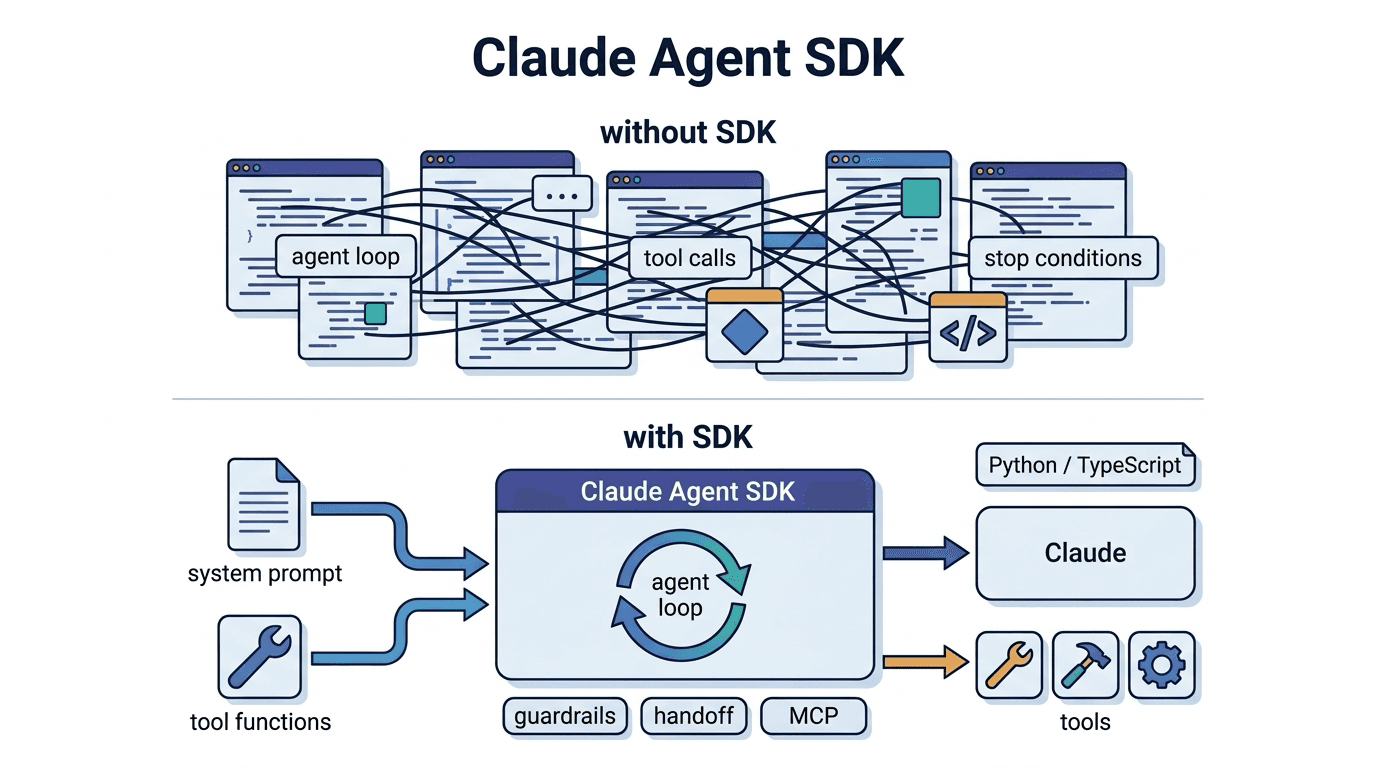
Claude Agent SDK
The Claude Agent SDK is a development kit provided by Anthropic for building AI agents. It is a fram
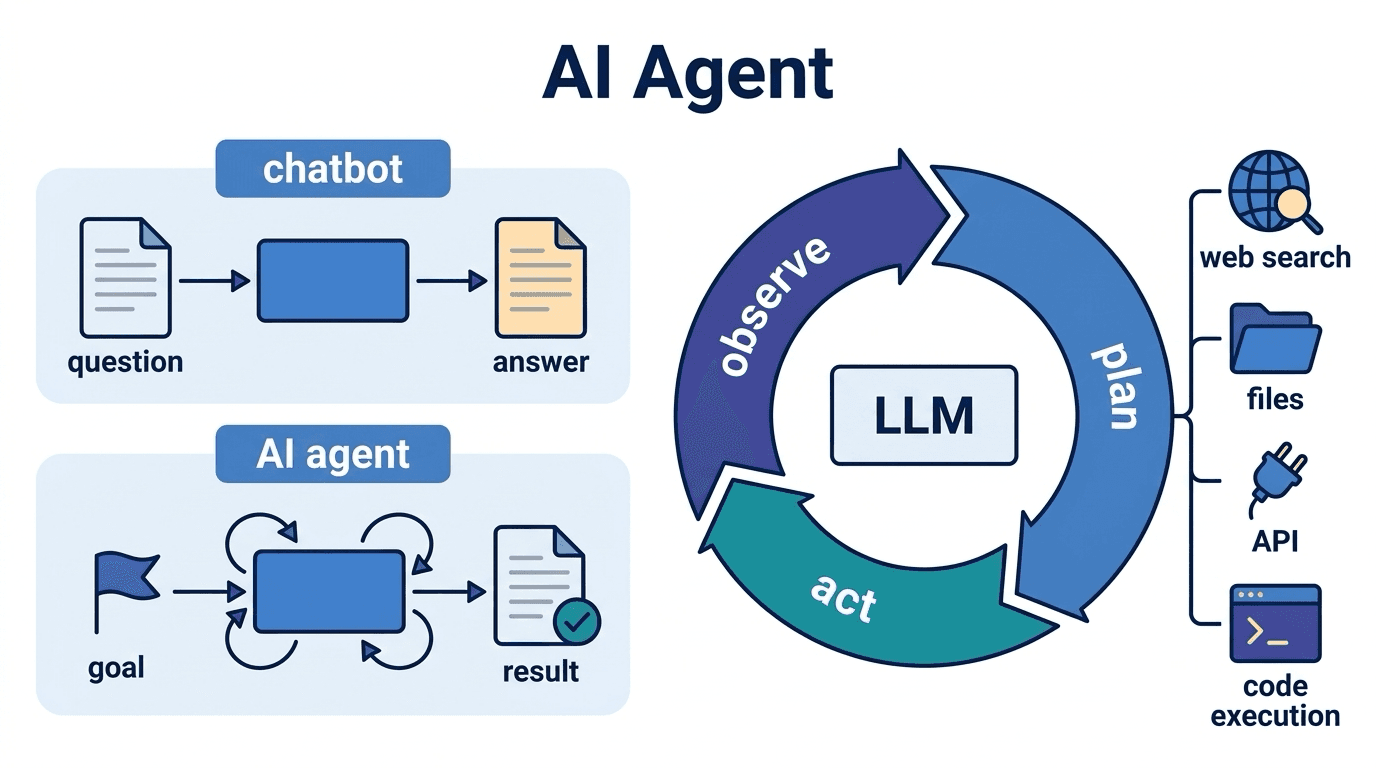
AI Agent
An AI agent is an AI system that autonomously formulates plans toward given goals and executes tasks
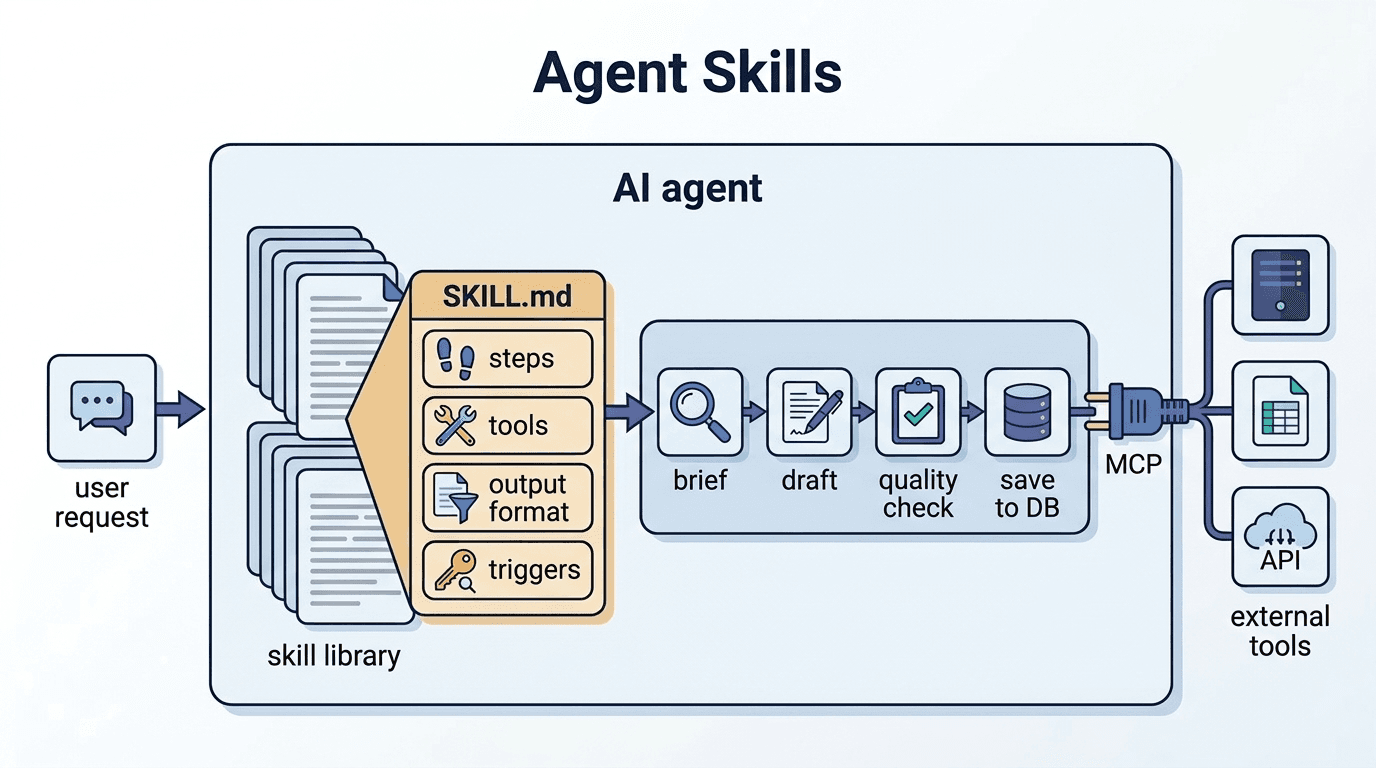
Agent Skills
Agent Skills are reusable instruction sets defined to enable AI agents to perform specific tasks or