Solving the N+1 Problem: An Implementation Checklist for Database Query Optimization

Introduction
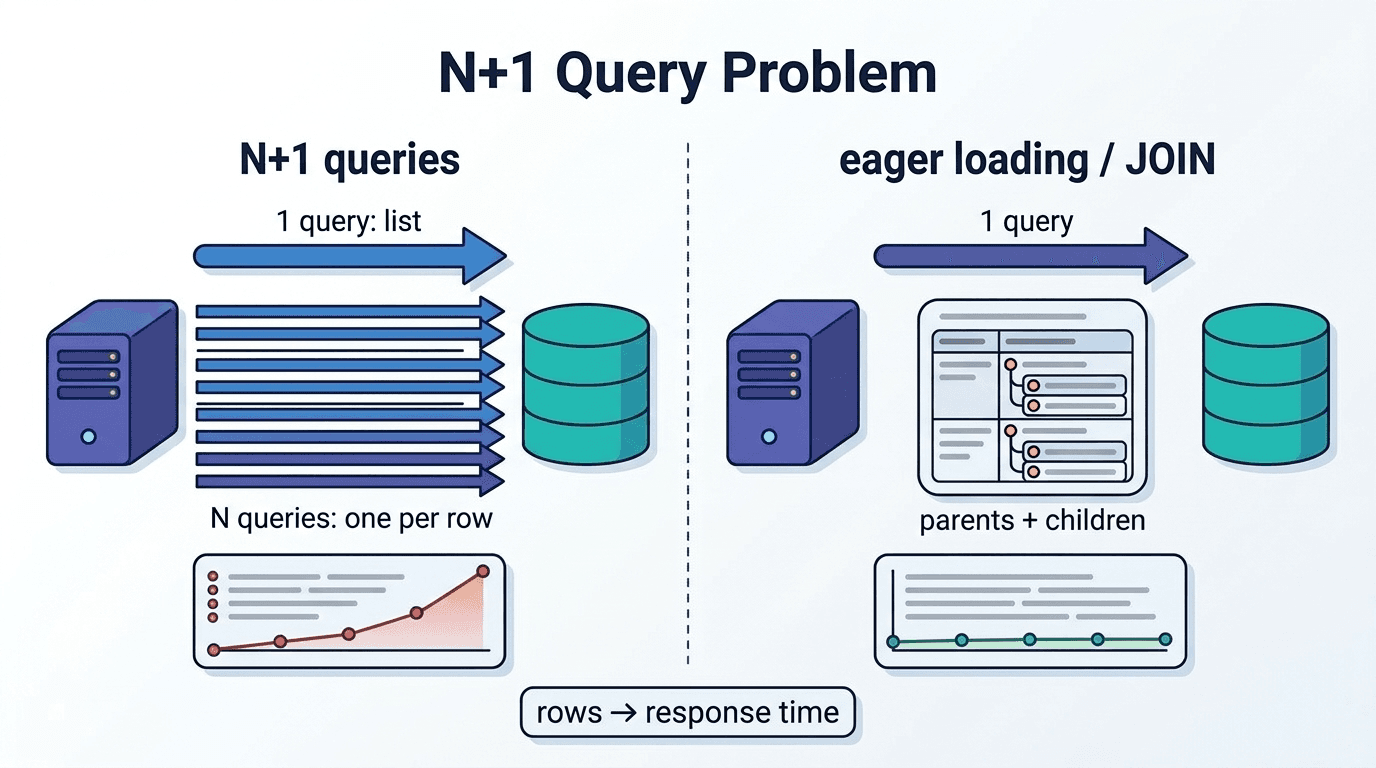
The N+1 problem is a performance issue in which the number of queries increases up to "N+1" as related data is queried individually after fetching a single parent record, and it can be resolved by following three stages: detection → root cause analysis → pattern selection. This article is aimed at backend developers using ORMs, database designers, and performance optimization engineers, and presents, in the form of an implementation checklist, everything from detection procedures using query logs and APM tools, to how to choose among three resolution patterns—JOIN, batch processing, and caching—to verification procedures after implementation. By the end of this article, you will be able to select the optimal approach based on the structure of your system's related data (single value or collection) and access frequency, and begin implementing solutions that reduce query execution counts to 1/10 or less. The comparison table and checklist can also serve as materials for sharing pattern-selection criteria within your team.
For the N+1 problem, before choosing a resolution pattern, you cannot measure the effectiveness of an improvement unless you first confirm, in numerical terms, the actual number of queries being issued. Whether the query count increases in proportion to the number of parent records is the criterion for determining whether N+1 is occurring. We will progressively pinpoint the root cause from three perspectives: manual verification via query logs, automatic detection using APM/profilers, and identifying the location in the code where it occurs.
Steps to Check Execution Count in Query Logs
Verifying the execution count starts by outputting the SQL issued by the ORM to a log and counting how many SELECT statements were executed for a single screen render or API response. In Django, you can obtain the count of executed SQL statements using connection.queries.
1from django.db import connection, reset_queries
2
3reset_queries()
4authors = Author.objects.all()
5for author in authors:
6author.books.all() # related fetch
7print(len(connection.queries))
If there are 10 parent records but the log shows 11 entries (1+10), N+1 is occurring. By checking whether the count increases or decreases in proportion to the number of records, you can identify the spots that have not been consolidated into a single query, such as with JOIN. The procedure is to first call the target screen/API once and record the query count, then double the number of parent records in the test data and re-run the same process. If the query count increases at roughly the same ratio, it's highly likely that the cause is related access within a loop, and you can narrow it down to the exact line number in the code from the log.
Automatic Detection with APM/Profilers
Manually checking logs is sufficient for verifying a single screen during development, but it takes considerable effort to comprehensively find occurrences in a production environment. Django Debug Toolbar displays, in the browser, a list of the number and content of SQL statements issued per request, allowing you to immediately check for the presence of N+1 on a screen-by-screen basis during development. In Ruby on Rails, incorporating the Bullet gem into your development/test environment lets you trigger log notifications or exceptions when a query pattern suspected of being N+1 is detected, enabling mechanical detection even before code review. If you want to grasp occurrence frequency and execution time in the production environment as well, using an APM tool to visualize sudden spikes in SQL execution counts or repeated identical queries within the same trace is effective. On the trace screen, the number of SQL statements per request is aggregated by endpoint, allowing you to prioritize investigating endpoints where the count has spiked after a release.
Key Points for Identifying the Source in Code
Identifying where the problem occurs comes down to finding the lines within a loop that access relation attributes. If, within a loop body such as for author in authors:, there is code reaching a related object like author.books.all() or author.profile.name, that line is the one generating queries proportional to the number of loop iterations. Cases where relations are implicitly traversed inside templates or serializers are also easy to overlook, so you need to expand the scope of your review beyond the view-layer code to include template files and API serialization logic as well.
As a way to identify the issue with certainty, there is a technique of setting SQLAlchemy's raiseload() on a suspicious relationship attribute, which raises an exception the moment lazy loading occurs. Since the exception's stack trace directly records the line number of the access source, this lets you narrow down the location faster than working backward from the log count.
N+1 Problem Solution Pattern Comparison Table

The basic policy is: if the relationship is single-valued (foreign key, one-to-one), consolidate it into a single query using JOIN; if the relationship is a collection (many-to-many, or one-to-many with a large number of records), choose batch processing; and additionally layer caching on top for reference data with low update frequency. The three axes of data volume, access frequency, and update frequency determine the appropriate approach, as shown below.
| Pattern | Number of queries | Suitable relationship shape | Caveats |
|---|---|---|---|
| JOIN (select_related / joinedload / eager_load) | 1 | Foreign key, one-to-one, or one-to-many with few children | Result rows expand to parent × child, and duplicate columns increase memory consumption |
| Batch processing (prefetch_related / selectinload / IN clause) | Around 2 | Many-to-many or one-to-many collections with many children | If the parent set is large, the number of arguments in the IN clause balloons |
| Batch fetching via proxy (@BatchSize, etc.) | Multiple times, but with reduced count | Resolving lazy-loading proxies | Batch size needs to be adjusted according to row size |
| Caching (Redis, etc.) | 0-1 | Reference data with low update frequency | Without separately designing invalidation timing, stale values continue to be returned |
When in doubt, first decide between JOIN and batch processing based on the shape of the relationship (single-valued or collection), and then consider adding caching only for data confirmed to have low update frequency. If caching is applied first to data with high update frequency, the risk of inconsistency due to missed invalidation increases before anything else, so resolving the issue via JOIN or batch processing should be prioritized.
Selection Criteria for Each Pattern
The selection criteria are determined by two axes: the ratio of related data counts and access frequency. For a one-to-many relationship where a parent has only a few children, JOIN is sufficient. However, if JOIN is used for a relationship where the children number in the dozens or more, the number of rows in the result set expands to parent × child, worsening transfer volume and memory consumption. In this case, switch to a method where batch processing retrieves the parent set in bulk, then joins it on the application side. As for the order of decision-making, first check whether the foreign key is required and the relationship is single-valued; if single-valued, tentatively decide on JOIN, and if it's a collection, tentatively decide on batch processing. Next, check whether that related data is reference-type data with low update frequency (such as master data or configuration values), and only if that applies, consider whether the result of the batch processing or JOIN itself can be omitted through caching. Conversely, applying caching to data with high update frequency causes inconsistency due to missed invalidation.
Pattern 1: Bulk Retrieval of Related Data Using JOIN

For relationships like foreign key or one-to-one, where a parent always has exactly one corresponding child, consolidating into a single query with JOIN eliminates the individual queries that were occurring within the loop. In a one-to-many relationship where the number of children is greater than one, the result rows expand, so the choice between INNER JOIN and LEFT JOIN changes how missing records are handled and how the row count is affected.
Implementation to Consolidate into One Query with INNER JOIN
Consolidation via INNER JOIN is an implementation where Django's select_related, SQLAlchemy's joinedload, and Rails' eager_load all internally generate a JOIN statement, retrieving parent and child data in a single SELECT. This is suitable when the foreign key is required (NOT NULL) and the related record is guaranteed to exist.
1# Django: consolidate into a JOIN with select_related
2books = Book.objects.select_related("author").all()
3for book in books:
4print(book.author.name) # No additional query
When select_related("author") is specified, the JOIN between Book and Author is combined into a single SQL statement, so accessing book.author within the loop does not trigger an additional query. In SQLAlchemy, writing joinedload(Book.author), or in Rails, Book.eager_load(:author), produces the same result — in each case, the generated SQL takes the form of a single SELECT statement containing a JOIN clause.
Precautions When Including NULL Values with LEFT JOIN
When you want to include in the results even parent records that have no related record, use LEFT JOIN. In business requirements where the foreign key is nullable and cases with zero related records must not be excluded (such as a list of users with no unread emails), INNER JOIN would cause the relevant records to be missing. Django's select_related automatically generates a LEFT OUTER JOIN for nullable foreign keys, so no additional specification is needed in the implementation.
1# Django: retrieve nullable profile too in a single query
2authors = Author.objects.select_related("profile").all()
On the application side, be sure to provide a branch for cases where the related object is None. Accessing something like author.profile.name without a NULL check will raise an exception for records where the relationship doesn't exist, so guard against it with something like author.profile and author.profile.name.
Pattern 2: Batch Retrieval of Multiple IDs via Batch Processing

For one-to-many or many-to-many relationships with a large number of child records, it is more suitable to avoid row expansion caused by JOINs and instead query the parent ID set collectively using an IN clause, then join the results in memory on the application side. Although this does not reduce the query count to a single query, it can be kept to around two queries. The key implementation points are how the IN clause is written and how the batch size is determined, both of which require adjustment according to the volume of data.
Implementation Example of Batch Queries Using IN Clause
Batch fetching via an IN clause is an implementation in which the list of parent record IDs is first collected, that set is queried with a single SELECT, and the results are then linked to a hash in memory on the application side. Django's prefetch_related and SQLAlchemy's selectinload automatically generate this approach internally.
1# A straightforward implementation of a batch query using an IN clause
2author_ids = [a.id for a in authors]
3books = Book.objects.filter(author_id__in=author_ids)
4
5books_by_author = {}
6for book in books:
7books_by_author.setdefault(book.author_id, []).append(book)
8
9for author in authors:
10author.books_cache = books_by_author.get(author.id, [])
In this code, Book is fetched only once before the loop, distributed into a dictionary keyed by author_id, and then assigned to each Author. Unlike a JOIN, the result row count does not expand to parent × child, so memory consumption can be kept low even for one-to-many relationships with a large number of child records.
There is also an implementation that uses itertools.groupby instead of manually writing the grouping into a dictionary, but note that this requires sorting by author_id beforehand.
How to Determine Batch Size
The batch size is determined by considering both the database's parameter limit and the application's memory usage, in order to set an upper bound on the number of IDs passed to the IN clause. In PostgreSQL and MySQL, there is no clear upper limit on the number of items in an IN clause itself, but exceeding a few thousand items can degrade the execution plan and lengthen query execution time. With JPA/Hibernate's @BatchSize, the value is typically adjusted within a range of about 10 to 100, controlling the number of items fetched in bulk during proxy resolution.
The order of decision-making is as follows. First, check the size per row of the target table (number of columns, string length), and then check the expected maximum number of parent records. If the row size is large (for example, including image URLs or long-text columns), it is better to keep each IN clause to a few hundred items; if it is simple master data with a small row size, batches of 1000 items are unlikely to cause problems.
Pattern 3: Reducing Query Execution with Caching Strategies

After reducing the number of queries through JOINs or batch processing, further omitting execution itself is only viable for reference data that is updated infrequently. Whether to add caching is determined based on the read ratio and the frequency of data changes. If the target is chosen incorrectly, there is a risk of continually returning stale values, so the selection of the storage destination and the design of invalidation timing should be considered separately.
Leveraging Memory Cache (Redis, etc.)
An in-memory cache such as Redis is a mechanism that stores results already obtained via batch processing on a per-key basis, omitting re-querying the database on subsequent accesses. Keys are designed by combining the parent ID and the relation name (e.g., author:123:books), and the values are stored as serialized lists. One thing that is easy to overlook here is that an implementation calling cache.get() individually inside a loop produces, at the cache layer itself, the same structure of repeated calls as the N+1 problem.
Setting Cache Invalidation Timing
For cache invalidation timing, the most reliable method is to delete the key immediately after a write operation. If you explicitly delete related keys such as author:123:books the moment an Author or Book record is updated or deleted, you can avoid the risk of continuing to return stale values.
1def save(self, *args, **kwargs):
2super().save(*args, **kwargs)
3cache.delete(f"author:{self.author_id}:books")
Invalidation omissions are prone to occur in processes that bypass signals or the ORM's save, such as bulk updates or direct SQL execution. For tables where such paths exist, rather than relying solely on delete hooks, you should also set a shorter timeout for the key as a secondary safeguard. As a general guideline, for reference data that is updated only a few times a day, set a timeout in the range of a few minutes to a few tens of minutes, so that even if the delete hook fails to fire, stale values will expire within a certain period. If the timeout is set too long, the impact of a missed invalidation will persist for a long time, so shorten it according to the write frequency.
Implementation Checklist for Solving N+1 Problems

To prevent gaps in implementation checks, organizing them into a list in the order of detection, classification, application, and verification makes decision-making faster.
| Check Item | Verification Method | Completion Criteria |
|---|---|---|
| Reproducing N+1 | Measure SQL count via query logs/APM | Confirmed proportional relationship between parent record count and issued query count |
| Classifying the relationship type | Determine whether it is a foreign key/one-to-one, or one-to-many/many-to-many | Identified in code whether it is a single value or a collection |
| Applying the pattern | Implement either JOIN or batch processing | Confirmed via logs that query count decreased after application |
| Verifying result count | Check for row inflation after applying JOIN | Confirmed that parent×child duplicate rows stay within a range that does not affect memory consumption |
| Determining caching targets | Check update frequency and read ratio | Caching limited to reference (read-only) data only |
| Designing invalidation | Set save/delete hooks or timeout | Key deletion process on write is implemented |
| Incorporating automatic detection | Introduce Bullet gem or Debug Toolbar into the development environment | Continuous detection possible via CI or the development workflow |
Once automatic detection is incorporated, you have a system in place that prevents N+1 issues from creeping into new code at the implementation stage. If there remain items where pattern selection is unclear, going back to the two axes of the relationship's count ratio and access frequency, and redoing the determination of whether it is a single value or a collection, will keep the judgment consistent.
FAQ: Avoiding Failure When Solving N+1 Problems

Resolution patterns are not always applied in isolation—there are cases where they need to be combined for each layer of the relationship. Also, when confirming improvements, if you verify without aligning the measurement conditions, you cannot correctly capture the load changes in the production environment. Below, we concretely organize the two points where judgment is most likely to diverge.
When Should Multiple Solution Patterns Be Combined?
The situation where multiple patterns should be combined is when a single screen contains multiple layers with different relationship shapes. As a hypothetical example, consider a screen that displays a list of authors, their books, and the order history for each book. Since Author→Book is a one-to-many collection with a large number of children, batch processing is chosen; since Book→Category is equivalent to one-to-one, it is consolidated into a single query via JOIN. Furthermore, since the book's category name is updated infrequently, the batch processing results are cached, while order history, which is updated frequently, is excluded from caching. The decision should be made per relationship rather than per screen, individually checking whether the foreign key is a single value, how many children there are, and whether the update frequency is low. If a single pattern is applied uniformly across all layers, row inflation from JOINs will occur in layers with large collections, and the IN clause of batch processing will become unnecessary overhead in single-value layers. By applying patterns separately for each relationship and later checking the results by layer under the "Applying the pattern" item in the checklist, you can prevent omissions in application.
How to Verify Performance After the Fix?
Verification after resolution is the task of re-measuring under the same procedure without changing the conditions measured before the fix, and recording the changes in the numbers.
- Re-measure the number of queries issued in the query log using the same test data count and the same endpoint as before the fix
- Vary the parent record count by 2x and 5x, and confirm that the query count does not increase proportionally (it stays constant at around 1-2 queries)
- For places where JOIN was applied, check whether the number of rows in the result set is within the expected range (whether the parent×child inflation does not exceed an acceptable amount)
- For places where caching was added, measure the response time for both cache hits and misses, and confirm that even on a miss, it remains within an acceptable range
- Using APM with production-equivalent data volume, confirm whether the number of SQL executions and total execution time within the same trace have improved
- For places where batch processing was applied, check via logs that the number of arguments in the IN clause does not exceed the batch size limit
As a hypothetical example, if a query that ran 101 times with 100 parent records before the fix now runs a constant 2-3 times even with 500 parent records after the fix, you can judge that the proportional increase has been resolved.
References
- docs.sqlalchemy.org/en/20/tutorial/orm_related_objects.html)Accessed September 28, 2026
- docs.djangoproject.com/en/dev/topics/db/optimizationAccessed September 29, 2026
- docs.djangoproject.com/ja/6.0/topics/db/optimizationAccessed September 29, 2026
- docs.djangoproject.com/en/5.1/ref/models/querysetsAccessed September 29, 2026
- docs.sqlalchemy.org/en/21/orm/queryguide/relationships.htmlAccessed September 29, 2026
- docs.sqlalchemy.org/en/14/tutorial/orm_related_objects.htmlAccessed September 29, 2026
- guides.rubyonrails.org/active_record_querying.htmlAccessed September 29, 2026
Author & Supervisor

Yusuke Ishihara
Started programming at age 13 with MSX. After graduating from Musashi University, worked on large-scale system development including airline core systems and Japan's first Windows server hosting/VPS infrastructure. Co-founded Site Engine Inc. in 2008. Founded Unimon Inc. in 2010 and Enison Inc. in 2025, leading development of business systems, NLP, and platform solutions. Currently focuses on product development and AI/DX initiatives leveraging generative AI and large language models (LLMs).
Recommended Articles