What is a Vector Database? A Complete Guide to How It Works, Top Product Comparisons, and RAG Applications

Lead
A vector database is a specialized database that stores data such as text and images as numerical vectors, enabling high-speed search based on semantic similarity.
With the widespread adoption of AI systems leveraging LLMs (Large Language Models), vector databases have rapidly gained attention as core infrastructure for RAG (Retrieval-Augmented Generation). There is a growing interest in vector databases as traditional RDBs and keyword search increasingly fall short of meeting requirements for "finding semantically similar documents."
This article provides a systematic explanation covering everything from the basic mechanisms and comparisons of major products to RAG applications and common failure patterns during implementation. It is intended to help engineers, architects, and product managers driving AI adoption develop a framework for selecting the right product for their organization's needs.
A vector database is a specialized database that stores text, images, audio, and other data as numerical arrays (vectors), enabling high-speed search based on semantic similarity. Taking a fundamentally different approach from traditional RDB keyword matching, vector databases have emerged as core infrastructure for AI development against the backdrop of the growing adoption of LLMs and RAG systems. The following sections explain the mechanisms, use cases, and product comparisons in order.
Defining Vector Databases and How They Differ from Traditional RDBs
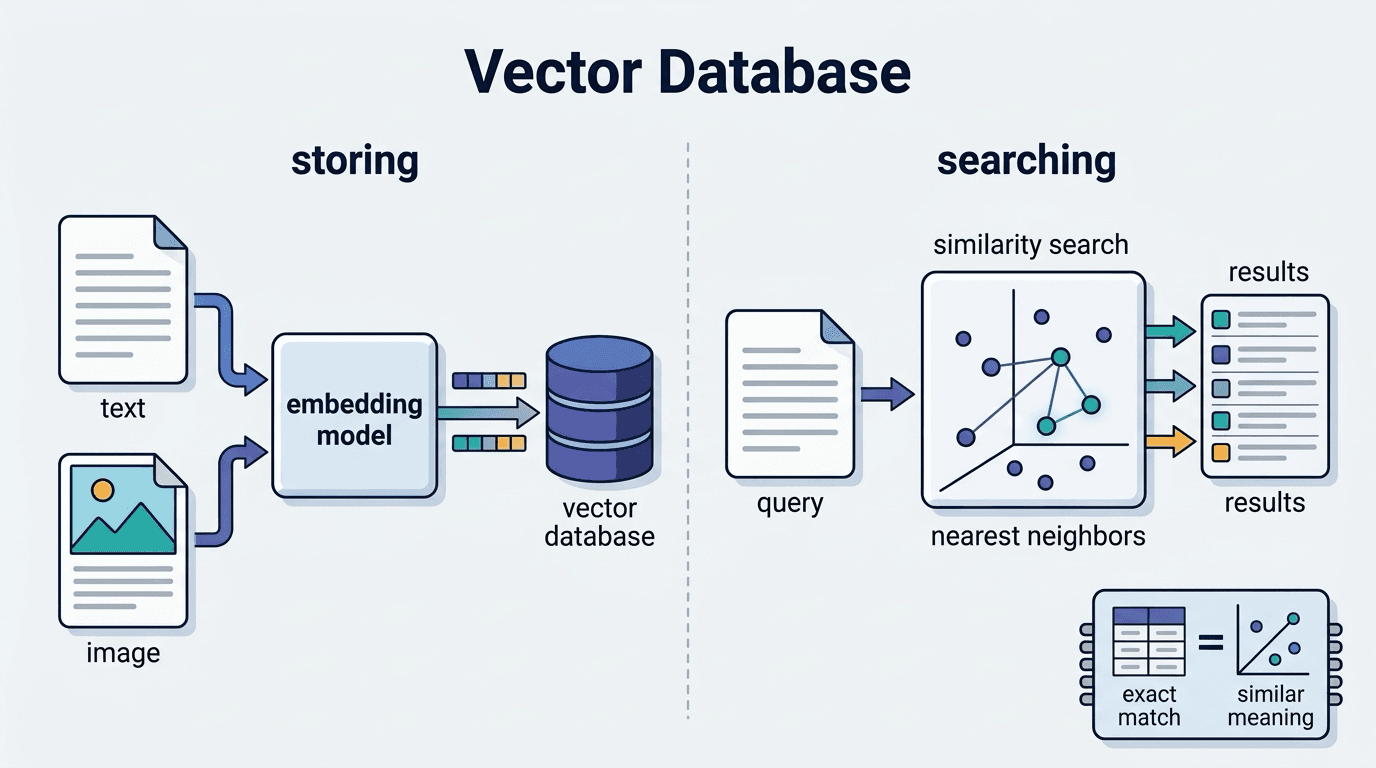
A vector database is a database that stores data such as text, images, and audio as arrays of floating-point numbers with hundreds to thousands of dimensions (vectors), and enables search based on the distance or similarity between vectors. While traditional RDBs (relational databases) excel at "exact matches" and "prefix matches," the defining characteristic of a vector database is its ability to return results based on semantic similarity.
Key Differences from Traditional RDBs
- Search axis: RDBs use exact matches and conditional expressions. Vector DBs use approximate nearest neighbor (ANN) search based on cosine similarity or Euclidean distance.
- Data structure: RDBs require schema definitions. Vector DBs can store unstructured data as long as embeddings can be generated.
- Indexing: High-dimensional vectors require specialized indexes such as HNSW and IVF, which are difficult to handle with the general-purpose B-tree indexes used in RDBs.
For example, if you search for "recommend a smartphone" in an RDB, only rows containing the keyword "smartphone" will be returned. With a vector DB, documents written as "mobile phone" or "handheld device" can also be retrieved as semantically similar results.
Vector databases are not a replacement for RDBs; they are a complementary solution specialized for semantic search over unstructured data. In RAG systems combined with LLMs (Large Language Models), this nearest neighbor search is the core function that determines the accuracy of responses.
How Embeddings and Vector Search Work
Embedding is a technology that converts data such as text, images, and audio into multi-dimensional numerical vectors in which semantic similarity is expressed as distance. The embeddings of "dog" and "cat" are positioned closer together in vector space than those of "dog" and "car." This property—where closeness in meaning equals closeness in distance—is the essence of vector search.
The Embedding Generation Process
- Text is input into an LLM (Large Language Model) or a dedicated model (such as Gemini Embedding 2).
- The model compresses the overall meaning of the text and outputs a floating-point vector with hundreds to thousands of dimensions.
- This vector is stored in a vector database and indexed.
How Vector Search Works
Queries are also vectorized using the same model, and similarity is calculated against the vectors stored in the database. The two most representative similarity metrics are cosine similarity, which measures the alignment of vector directions (widely used in text search), and Euclidean distance, which measures straight-line distance (suited for images and audio).
As data volume grows, brute-force search comparing all entries becomes impractical, so Approximate Nearest Neighbor (ANN) algorithms are used. The representative HNSW algorithm uses a hierarchical graph structure to dramatically improve search speed at a slight cost to accuracy.
It is important to note that embeddings for queries and documents must always be generated using the same model. If different models are used, the structure of the vector space changes, rendering similarity calculations meaningless—a pitfall that is well known to be easy to overlook during implementation.
Why Vector Databases Are Gaining Attention Now
Behind the rapid surge in attention lies a major turning point: the widespread adoption of LLMs (Large Language Models). As generative AI entered the practical stage, demand exploded for the ability to "have the model answer questions using our own data." Vector databases have become an indispensable component as the core infrastructure for RAG (Retrieval-Augmented Generation), the primary means of achieving this.
The main factors driving demand are as follows:
- Accelerating business adoption of generative AI: Use cases for having LLMs reference internal documents and product manuals have increased, making semantic similarity search essential.
- Improved accuracy of embedding models: The emergence of high-performance models such as Gemini Embedding 2 has dramatically improved the accuracy of converting text and images into high-dimensional vectors.
- Expansion of managed services: The growth of cloud-based services has significantly lowered the barrier to adoption compared to before.
The limitations of traditional keyword search—its inability to capture "semantically similar" information—have also become apparent in practice. "Contract termination procedure" and "cancellation flow" carry the same meaning, yet full-text match search treats them as entirely different. Vector search clearly demonstrates its practical value by bridging this gap.
With these technological and business tailwinds converging, vector databases have attracted star-level attention as the unsung backbone of AI systems.
What Are Vector Databases Used For?

Vector databases are rapidly expanding their scope of application as core infrastructure for LLM-powered systems. While the most representative use case is internal document search via RAG, they are also increasingly being used as the memory foundation for recommendation engines and AI agents. Since the design philosophy required differs by use case, it is worth first gaining an understanding of the overall picture.
Applications in RAG Systems
RAG (Retrieval-Augmented Generation) is a design pattern that compensates for the knowledge limitations of LLMs (Large Language Models). It dynamically retrieves internal documents and up-to-date information not included in training data at inference time, enabling higher answer accuracy while suppressing hallucinations.
Vector databases play a central role as the "search engine" of this RAG system. The processing flow is as follows:
- Index construction: Internal documents are vectorized using an embedding model and stored in the DB
- Query conversion: The user's question is vectorized using the same model and used as a search query
- Nearest neighbor search: Semantically similar chunks (document fragments) are retrieved at high speed
- Context injection: The retrieved documents are appended to the LLM's prompt, enabling it to generate responses grounded in evidence
This mechanism is particularly effective in scenarios involving frequently updated information. Keeping up with internal regulations and technical specifications via fine-tuning is prohibitively costly. By simply adding or updating documents in the vector database, the knowledge referenced by the LLM can be reflected in near real time.
This is also noteworthy from a grounding perspective. Passing the metadata of retrieved documents (source, last updated timestamp) to the LLM makes it easier to explicitly state the basis for answers, which tends to facilitate accountability in enterprise use cases.
Applications in Similar Document Search and Recommendations
Vector databases play a central role not only in RAG but also in the areas of similar document search and recommendations. Their greatest strength is the ability to return results based on semantic proximity rather than keyword matching.
Application to Similar Document Search
In fields such as law, medicine, and research, where large volumes of specialized documents are handled, there is significant demand for tasks such as "finding case law with the same intent" or "retrieving similar case reports." Conventional full-text search is reported to struggle with variations in notation and synonym barriers, but vector search using embeddings measures similarity by distance in semantic space, making it easier to surface related documents even when the wording differs.
Representative use cases include the following:
- Automatic suggestion of related documents from an internal knowledge base
- Prior art searches in patent and academic paper databases
- Presenting similar past inquiry histories in customer support
Application to Recommendations
On e-commerce sites and video platforms, vectorizing the characteristics of products and content and combining them with nearest neighbor search against user behavior history vectors tends to enable personalization even with limited data. The ability to mitigate the cold-start problem for new users and newly added items is also attracting attention.
There is also strong compatibility with multimodal search, which embeds text, images, and audio into a shared embedding space, enabling cross-modal use cases such as "search by image and return similar products." Since recommendation quality depends heavily on the choice of embedding model and feature design, these points warrant careful consideration at the time of implementation.
Role as a Memory Foundation for AI Agents
External memory is essential for AI agents to maintain context across multiple tasks. Because LLMs are constrained by their context window, they are not well suited for long-term information accumulation. Vector databases function as that external memory, effectively extending an agent's "capacity to remember."
Use cases can be broadly categorized into three types:
- Short-term memory supplementation: Conversation history and operation logs are vectorized and stored, enabling similar contexts to be retrieved quickly at the next step
- Long-term memory construction: User preferences and past decision-making patterns are accumulated as embeddings, enabling continuously personalized responses
- Tool memory: Descriptions of available tools are vectorized in advance and semantically searched and invoked according to the task at hand
In multi-agent systems, having multiple agents reference a shared vector database tends to facilitate smooth knowledge handoff between agents and reduce redundant processing.
One important consideration is memory freshness management. There is a risk that outdated information mixed into search results will degrade decision-making accuracy. A design that combines TTL settings and metadata filtering to periodically clean up unnecessary memories is required.
How to Set Comparison Criteria

One of the most common points of confusion in product selection is determining the comparison criteria—that is, deciding what to evaluate against. Because vector databases differ in their areas of strength from product to product, relying on a simple specification comparison can easily lead to misjudgments. Prioritizing comparison criteria according to the scale of the project, search requirements, and operational structure is what leads to a selection decision you won't regret.
Evaluating Scalability, Latency, and Cost
To prevent product selection failures, it is important to evaluate scalability, latency, and cost as three independent axes.
Scalability is measured by how response performance changes as the number of vectors increases.
- Horizontal scaling capability: Products with distributed architecture support, such as Milvus, have been reported to scale to hundreds of millions of records.
- Index update method: Verify whether the system requires a full rebuild with each data addition, or whether it supports incremental updates like HNSW.
- Managed vs. self-hosted: Pinecone offers lower operational overhead for scaling out, but tends to incur higher costs at larger scales.
Latency is directly tied to the choice of ANN (Approximate Nearest Neighbor) algorithm. HNSW is fast but memory-intensive, while IVF-based approaches are more memory-efficient but prone to accuracy trade-offs. When latency requirements are strict, products designed for in-memory operation (such as Redis or Qdrant's memory mode) become viable options.
Cost should be compared not just by monthly fees, but by Total Cost of Ownership (TCO). Managed services often use consumption-based pricing tied to query volume, which carries the risk of costs spiking during traffic surges. Open-source options carry no licensing fees, but the labor costs of infrastructure management must not be overlooked.
Since the priority of these three axes varies depending on the nature of the project, the most effective approach is to finalize requirements first, then narrow down product options.
Hybrid Search Support (BM25 + Vector)
Vector search alone handles proper nouns and abbreviations poorly. Specialized terms such as "ISO 27001" and "GPT" tend to lack semantically close vectors in the embedding space, and cases of missed results with pure similarity search have been reported.
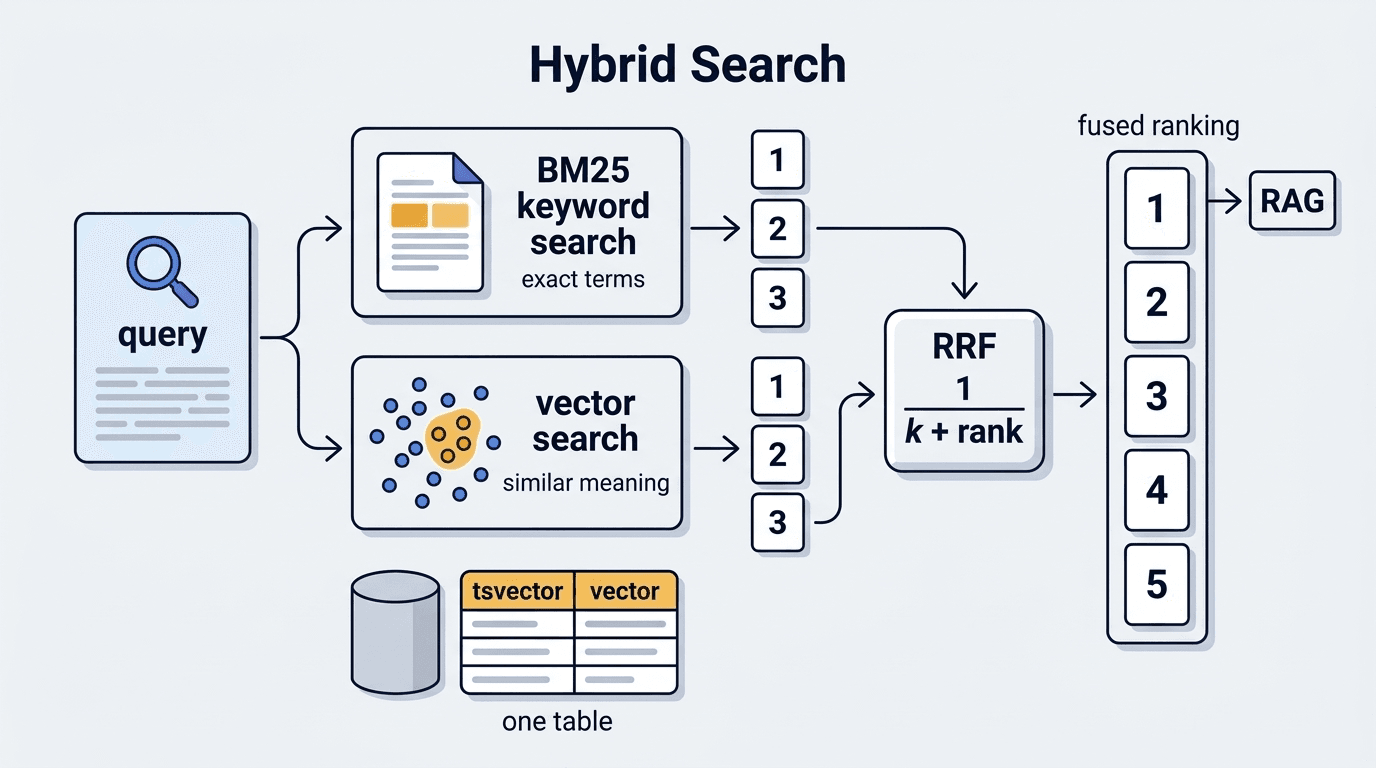
Hybrid search — combining sparse search methods such as BM25 with vector search — compensates for this weakness. By integrating scores from both using RRF (Reciprocal Rank Fusion), it is possible to leverage both keyword matching and semantic similarity.
The support status for each product is as follows:
- Weaviate: Natively supports hybrid search combining BM25 and vector search. Score integration via RRF is provided at the API level.
- Qdrant: Designed to handle Dense Models and Sparse Models (such as SPLADE) within the same collection.
- Milvus: Supports sparse vectors as of version 2.4, enabling BM25-equivalent scoring to be incorporated.
- Pinecone: Offered as a "Sparse-Dense" index. Configuration flexibility tends to be more limited compared to self-hosted options.
- pgvector: Requires integration with PostgreSQL's full-text search functionality (
tsvector); score integration is left to application-level implementation.
During product selection, it is worth confirming whether the capability is a native feature or requires implementation at the application layer. The latter tends to introduce operational costs such as RRF parameter tuning and increased search latency. For RAG systems that make heavy use of specialized terminology, prioritizing products with native support is recommended.
Comparing Major Vector Database Products

The three main categories of options are managed services, open-source, and existing database extensions. Since operational overhead and cost structures differ significantly by category, it is important to compare them in alignment with the project's phase and requirements. Each H3 section organizes the characteristics and suitable use cases of representative products within each category.
Managed Service Type (Pinecone, Weaviate Cloud)
The greatest strength of managed service offerings is the ability to delegate infrastructure management to a vendor. There is no need to handle server provisioning or scaling in-house, making it easier to focus on AI application development.
Pinecone is widely adopted as a fully managed SaaS solution dedicated to vector databases.
- Serverless architecture: Automatically scales in response to request volume, making it easier to keep costs low during idle periods.
- Low-latency search: Tends to provide millisecond-order ANN search even for vector sets in the millions.
- Simple API: Well-developed SDKs for Python and Node.js make integration into RAG pipelines relatively straightforward.
However, access to custom infrastructure is restricted, which can limit flexibility in cases where fine-grained tuning is required. Pricing figures are reference values at the time of writing; always check the latest pricing page for current information.
Weaviate Cloud is a service that provides the open-source Weaviate in a managed environment.
- Built-in hybrid search: Score integration combining BM25 and vector search is available out of the box.
- Multimodal support: Embeddings across multiple modalities — such as text and images — can be handled within a single schema.
Compared to Pinecone, it has more configuration options and a somewhat steeper learning curve, but has been reported to offer an expressive advantage in enterprise environments with complex data models. Both services offer free tiers, making them easy to use for evaluation during the PoC phase.
Open Source Type (Qdrant, Milvus, Chroma)
For teams seeking flexible configurations while keeping costs down, open-source options are a strong choice. The ability to deploy on their own infrastructure and modify source code represents the key differentiator from managed service offerings.
Qdrant is characterized by its lightweight Rust-based architecture, with reports of low latency and low memory usage. It excels at filtered search combining metadata conditions with Approximate Nearest Neighbor (ANN) search, and its low startup cost during the PoC phase — thanks to single Docker image local deployment — is a notable advantage.
Milvus features a distributed architecture designed for horizontal scaling, making it well-suited for large-scale use cases handling billions of vectors.
- Multiple index algorithms are available, including IVF_FLAT, HNSW, and DiskANN.
- Production operations can be automated using the Kubernetes-based Milvus Operator.
Chroma offers high affinity with the Python API, and integration with LangChain and LlamaIndex can be completed with virtually zero configuration. However, operational track records at scales exceeding several million records tend to be more limited compared to Milvus or Qdrant, so when scale requirements are clear, early evaluation is advisable.
Recommended selection guidelines by use case are as follows:
- Rapid startup / small to medium scale → Qdrant
- Billions of records / distributed processing → Milvus
- Python ecosystem-centric / PoC-first → Chroma
It is recommended to consult the official documentation of each project for licensing details and the latest specifications.
Existing DB Extension Type (pgvector, Redis)
The greatest strength of the extension-based approach is its ability to add vector search while keeping existing infrastructure intact. For teams looking to minimize operational costs for new services, it represents a realistic first step.
pgvector operates as a PostgreSQL extension module, allowing vector search to be executed with the same familiar SQL syntax.
- Approximate nearest neighbor search is enabled simply by adding an
ivfflatorhnswindex - Because it can JOIN with existing tables, user attribute filtering and similarity search can be completed in a single query
- Supported by major managed services including AWS RDS and Supabase
However, latency tends to degrade with datasets exceeding tens of millions of records. If large-scale operation is on the horizon, it is worth considering an early migration to a dedicated vector database.
Redis (the RediSearch module in Redis Stack) is characterized by low latency through in-memory processing. Use cases have been reported in real-time recommendations requiring millisecond-level responses, as well as short-term memory infrastructure for AI agents. The ability to automatically delete vectors via TTL settings is also a practical advantage. On the other hand, PostgreSQL is often better suited for knowledge bases requiring long-term storage.
A simple decision framework for choosing between the two is sufficient: "pgvector for additions to an existing PostgreSQL environment, Redis when speed is the priority."
Which Product Should You Choose for Your Use Case?

There is no "universally correct answer" in product selection — the optimal choice varies depending on the project phase, scale, and the team's operational capabilities. Comparing products solely on features risks overlooking operational costs and learning costs. The following sections organize the selection approach across two stages: "PoC / small-scale validation" and "production operation / enterprise."
Choosing a Solution for PoC and Small-Scale Validation
In the PoC (proof of concept) or small-scale validation phase, the top priority is "how quickly hypotheses can be validated." When time is consumed by infrastructure setup, confirming the viability of use cases tends to get pushed back.
Key selection criteria at this stage
- Ease of setup: Can it be launched locally with a single command?
- Free tier / OSS availability: Can it be tested without incurring costs?
- Integration with LangChain and LlamaIndex: Is a Python SDK well-maintained?
Chroma can be launched in-memory locally, and a full RAG workflow can be verified in just a few dozen lines of code. Its ease of use — allowing search queries to be tested from day one of prototyping — makes it well-suited for small-scale validation.
Qdrant can be launched with a single Docker image and comes with a well-maintained REST API. Because it is designed with a path from PoC to production in mind, it tends to be a good fit for teams that want to "move directly to production after validation."
For those who want to try a managed service, Pinecone's free tier is an option, but given its limitations on the number of indexes and vectors, caution is advised when validating behavior with large-scale data (check the official page for the latest restrictions).
One often-overlooked consideration is verifying compatibility with the embedding model. Since search accuracy varies significantly depending on the number of dimensions and whether normalization is applied, using the model intended for production from the PoC stage is a prerequisite for meaningful accuracy comparisons across phases.
Choosing a Solution for Production and Enterprise Use
In the production operation phase, different evaluation criteria are required compared to the PoC stage. The three key dimensions to evaluate are availability, security, and operational cost.
Priority selection criteria
- SLA / availability: Is an uptime guarantee of 99.9% or higher provided?
- Access control: Is RBAC and VPC private endpoint support available?
- Scalability: Do sharding and distributed indexes function effectively at the scale of hundreds of millions of records?
- Audit logs: Is log output available to satisfy compliance requirements?
Advantages of managed service offerings
Pinecone and Weaviate Cloud are designed so that the service provider handles backups and auto-scaling. When the operational team's resources are limited, this tends to make it easier to keep total cost of ownership (TCO) down.
Considerations for self-hosted deployments
When deploying Milvus or Qdrant on-premises, operational automation via Kubernetes operators is effectively a prerequisite. Milvus in particular has many distributed components, and cases have been reported where operational proficiency directly impacts search latency and stability.
Compatibility with existing stacks
In environments already running PostgreSQL in production, extending with pgvector can be an option for reducing migration costs. However, at scales exceeding tens of millions of records, a performance gap in search tends to emerge compared to dedicated products, so pre-validation through load testing is recommended.
Common Pitfalls When Implementing Vector Databases

While the technical setup for vector database adoption has become easier, cases have been reported where systems end up in a state of "running but not delivering accurate results." The cause in most cases lies not in the infrastructure, but in data design and search logic. The following H3 sections take a closer look at two failure patterns that frequently occur in practice.
Mismatches Between Chunk Size and Embedding Models
A pitfall that tends to be overlooked during implementation is a mismatch between chunk size and the embedding model. No matter how capable the chosen model is, retrieval accuracy tends to drop significantly if the chunking design is misaligned.
Typical Patterns Where Mismatches Occur
- Chunks that are too small: Splitting text into roughly one or two sentences causes context to be lost. Cases have been reported where querying for something like "how to cancel a subscription" returns only chunks containing fragments of the procedure.
- Chunks that are too large: Multiple topics become mixed together, pulling the vector toward an "averaged meaning." Results tend to match any given query only moderately well.
- Exceeding the model's maximum token length:
all-MiniLM-L6-v2has an upper limit of around 256 tokens, whiletext-embedding-ada-002supports up to 8,192 tokens. Exceeding the limit leads to truncation of the trailing content or errors, so it is essential to verify the specifications for each model in advance (check the official documentation).
Key Countermeasures
- Design chunk sizes to align with the embedding model's recommended input length.
- Consider "semantic chunking," which prioritizes the logical structure of the document.
- Adding an overlap of approximately 50–100 tokens between chunks tends to mitigate context breaks near boundaries.
Deciding "which model to use" and "the chunking strategy" together at the design stage is the most straightforward way to reduce rework in later stages.
Cases Where Poor Index Design Degrades Search Accuracy
The performance of a vector database is heavily influenced not only by the quality of the embeddings but also by index design. Misconfiguration tends to degrade the overall answer quality of a RAG system.
Commonly reported failure patterns are as follows:
- Misconfigured ANN algorithm parameters: Setting HNSW's
ef_constructionormtoo low speeds up index construction but tends to significantly reduce recall during search. - Over-reliance on flat indexes: A full scan is effective for small-scale PoCs, but continuing to use it once the number of vectors exceeds several hundred thousand tends to cause a sharp increase in latency.
- Incorrect metadata filter application order: If filters are configured to be applied after the search, the candidate set becomes too small, degrading the quality of the top results.
One aspect that is easy to overlook is index fragmentation. As data is continuously added and updated, retrieval accuracy gradually degrades. In systems such as Milvus, periodic compaction is recommended and should ideally be incorporated into the operational workflow.
Index design is not a one-time decision; continuously revisiting it as data volume grows is key to maintaining accuracy.
How to Achieve Higher Accuracy in RAG Systems

Vector search alone tends to have limitations when it comes to exact keyword matching and handling specialized terminology. To further improve the answer quality of a RAG system, it is effective to strengthen the retrieval layer itself. The following sections cover two approaches: hybrid search, which combines BM25 and vector search with score integration via RRF, and GraphRAG, which leverages knowledge graphs.
Score Integration via Hybrid Search and RRF
Vector search alone is weak at exact matching of proper nouns and code, while sparse search methods such as BM25 cannot capture semantic similarity. Hybrid search is designed to compensate for these weaknesses, and RRF (Reciprocal Rank Fusion) is widely adopted as the algorithm for integrating scores.
RRF integrates results using rank rather than score magnitude.
- Score = Σ 1 / (k + rank_i) — where k is a constant (typically 60)
- The scores from each method are summed to determine the final ranking.
Its practical strength lies in the ability to combine retrieval methods with different scales without normalization.
Concretely, BM25 tends to be better at picking up proper nouns such as "pgvector," while vector search excels at semantic queries like "What DB can scale cost-effectively?" Integrating the two with RRF tends to surface documents that either method alone would have missed.
On the implementation side, Weaviate and Qdrant natively support hybrid search, allowing the balance between vector and sparse retrieval to be adjusted via an alpha value. With pgvector, a similar configuration can be achieved by combining it with a full-text search index, though the tuning effort increases.
It should be noted, however, that hybrid search is ultimately a means of raising the baseline retrieval accuracy. The quality of the embedding model and the chunk size design are prerequisites; if the quality of the input data is poor, the effect will be limited.
Enhancing Contextual Understanding by Combining with Graph-RAG
Vector search alone struggles to capture "relationships between concepts." GraphRAG is attracting attention as a technique to address this weakness.
GraphRAG is an approach that combines a Knowledge Graph with RAG (Retrieval-Augmented Generation). Entities extracted from documents are structured as nodes and their relationships as edges, allowing candidates narrowed down by vector search to be explored further on the graph. Its greatest strength is the ability to pass context to an LLM (Large Language Model) that would not be visible through simple embedding distance alone.
The main cases where improvements have been reported are as follows:
- Multi-hop reasoning: There is a tendency for answer accuracy to improve on questions that span multiple entities.
- Contradiction detection: Entity resolution via the graph structure can reduce the risk of passing contradictory information to the LLM.
- Improved summarization quality: Generating summaries at the level of related node clusters makes it easier to cover a broad range of topics.
It is also important to be aware of the considerations when adopting GraphRAG. The cost of building and updating the graph is higher than that of a vector index, and the accuracy of entity extraction directly affects graph quality. A practical approach is to first measure the accuracy baseline using vector search alone, then layer in GraphRAG incrementally for scenarios that require multi-hop reasoning.
Frequently Asked Questions (FAQ)

We address two questions that frequently arise when considering the adoption of a vector database. "How does it differ from existing databases?" and "Can it be integrated into our own system?" are topics that tend to serve as key criteria in product selection.
What Is the Difference Between a Vector Database and a Cache DB?
Vector databases and cache databases are often confused as both serving the role of "fast data access." However, their design philosophies and areas of strength are entirely different.
Characteristics of cache databases (e.g., Redis)
- A temporary data store specialized for exact-match key-value lookups
- Designed around volatility management via TTL (time-to-live)
Characteristics of vector databases
- A persistent data store that holds embeddings and performs semantic approximate nearest neighbor (ANN) search
- Accelerates similarity computation across high-dimensional vectors using index structures such as HNSW and IVFFlat
A concrete example makes this easier to understand. If a user enters "Tell me how to save electricity," a cache database can return nothing if the exact key does not exist. A vector database, on the other hand, can discover documents that are semantically close, such as those covering "energy-saving measures" or "reducing electricity bills."
In practice, many RAG systems combine both: semantic search is performed via the vector database, while the results of frequent queries are temporarily stored in a cache database to reduce latency. Rather than choosing one or the other, the realistic approach is to use them together with clearly defined roles.
Can You Use Existing PostgreSQL As-Is?
To state the conclusion upfront: by introducing the pgvector extension, PostgreSQL can be used as a vector database. Since existing schemas and SQL assets can be used as-is, this is a practical option for teams looking to minimize migration costs.
However, "usable as-is" comes with conditions.
- Extension installation: You must run
CREATE EXTENSION vector;and add a vector-type column - Manual index configuration: Without explicitly creating an IVFFlat or HNSW index, queries will fall back to a full table scan, causing a sharp increase in latency
- Dimension limit: As of the time of writing, up to 2,000 dimensions are supported. If you are using a high-dimensional model such as Gemini Embedding 2, check the official documentation for the latest specifications
Performance at scale is also a concern. When handling more than several million vectors, memory management and VACUUM processing tend to become bottlenecks. Dedicated vector databases are designed with large-scale workloads in mind, so the performance gap tends to widen as data volume grows.
On the other hand, pgvector works well for small-to-medium-scale RAG systems and during the PoC phase. Use cases such as implementing personalized search by JOINing with existing user tables can actually become more complex to implement with a dedicated database.
Starting with pgvector and switching to a dedicated database once bottlenecks become apparent is a low-risk, practical approach.
Summary: Three Key Points for Selecting a Vector Database

Selecting a vector database based solely on name recognition is an area where regret is common. Drawing on the content of this article, we outline three key points that should drive your decision-making.
① Choose a product that matches your current phase
In the PoC phase, prioritize ease of setup and a generous free tier. Chroma and Qdrant can be launched locally in a matter of minutes, allowing you to focus on experimenting with embeddings. In production, SLA guarantees, authentication and encryption support, and ease of scaling out become essential. Since the cost of switching between phases can be surprisingly high, it is advisable to choose with future requirements in mind.
② Verify support for hybrid search
It has been reported that vector search alone can suffer accuracy degradation on queries containing technical terms or proper nouns. Whether a solution supports hybrid search — integrating BM25 and vector search via RRF — has a significant impact on the quality of a RAG system. Weaviate and Qdrant offer native support, while pgvector requires a separate implementation, which is worth factoring into your decision.
③ Lock in alignment with your embedding model first
Chunk size, the dimensionality of the embedding model, and its maximum token count form the foundation of index design. Changing these after the fact requires re-indexing all data. The right order is to decide on the model first, then design the database and index around it.
A vector database can be thought of as the "memory" of an AI system, and the quality of your selection directly affects the performance of your RAG pipelines and AI agents. Use the three points above as your framework, and choose the product that best fits your organization's use case.
Author & Supervisor

Yusuke Ishihara
Started programming at age 13 with MSX. After graduating from Musashi University, worked on large-scale system development including airline core systems and Japan's first Windows server hosting/VPS infrastructure. Co-founded Site Engine Inc. in 2008. Founded Unimon Inc. in 2010 and Enison Inc. in 2025, leading development of business systems, NLP, and platform solutions. Currently focuses on product development and AI/DX initiatives leveraging generative AI and large language models (LLMs).
Recommended Articles


Terms related to this article
Vector Database
A vector database stores text, images, and other data as numerical vectors (embeddings) and provides
Hybrid Search
Hybrid search is a technique that combines keyword-based full-text search (such as BM25) with vector

Semantic Search
Semantic search is a method that returns search results based on the "semantic proximity" between a