Claude Code Team Adoption Guide — How to Standardize Your Development Workflow with CLAUDE.md, Skills, and Hooks

Lead
Claude Code is an AI coding agent that runs in the terminal, and its use for boosting individual productivity has become widely known. However, the moment a team tries to move to the stage of "using it to its full potential across the entire team," the difficulty spikes dramatically. Usage varies from engineer to engineer, context has to be explained from scratch every time, review perspectives aren't shared, and commands that were supposed to be prohibited get run by other team members — these challenges stem not from tool selection, but from a failure to standardize how the team uses the tool.
Observing teams that have successfully adopted it, they all share three common structures: CLAUDE.md, a project-level context file; Skills, which extract reproducible tasks; and Hooks, which can intercept before and after tool execution. With these three in place, the AI operates at the same quality regardless of who starts the conversation, and the team's unique knowledge is automatically accumulated as an asset.
This article walks through the steps to set up these three structures for embedding Claude Code into team development, along with strategies for avoiding the pitfalls teams commonly fall into after adoption. By the time you finish reading, you should have a clear picture of what to start with in the first month and what kind of operation to aim for by the three-month mark.
The starting point for team adoption is setting up CLAUDE.md. CLAUDE.md serves as a shared project memory; Claude Code reads relevant CLAUDE.md files by traversing from the current working directory up to parent directories. Personal settings can be placed in ~/.claude/CLAUDE.md, or imported into CLAUDE.md using @~/.claude/individual-file.md. CLAUDE.local.md is deprecated and should not be used in new setups. A CLAUDE.md placed in a subdirectory is referenced when working with files under that directory. By writing the project's tech stack, coding conventions, and prohibited actions here, you eliminate the need to re-explain things at the start of every conversation and ensure consistent results regardless of who runs it.
If you proceed with team adoption without a CLAUDE.md, the prompts each engineer writes at the start of a conversation will differ, leading to unstable output quality. The result is a classic pattern where the perception that "AI is unusable" spreads and the adoption effort collapses. Building this shared foundation first determines the success of everything that follows.
There's no need to aim for a finished product right away. The practical approach is to write only the minimum necessary information at first, then add to and split it as you go. After a week of running the project, the gaps in your CLAUDE.md will inevitably become visible.
Minimum Required Items (Stack, Rules, Prohibitions)
The content to include in CLAUDE.md can be organized into four broad categories.
Project-shared instructions go in ./CLAUDE.md, while personal settings go in ~/.claude/CLAUDE.md. The legacy CLAUDE.local.md is deprecated; if needed, use imports to reference individual instructions.
The first category is a project overview: spell out the tech stack, package manager, and how to start the development server, one line each. Write the information that every team member treats as a given — such as "Next.js + Supabase + Tailwind," "using pnpm," and "pnpm dev starts on port 5000" — as the top priority.
The second category is coding conventions: describe indentation by language, the language for comments, and naming rules. Anything already enforced by existing linter settings can be referenced briefly; focus instead on conventions the linter won't catch, such as "write comments in Japanese" or "function names in English."
The third category is prohibited actions: write out team-agreed rules directly, such as "use pnpm, not npm," "do not edit .env.local," and "do not delete the cache with rm -rf .next." Prohibited actions are particularly impactful. By explicitly stating what you don't want done, you can preemptively block the choices AI tends to make by default.
The fourth category is commonly used commands: briefly list commands for testing, linting, type checking, applying migrations, deploying, and so on. This prevents the AI from having to ask "which command do I use to run tests?" every single time.
How to Split Project-Specific Rules (rules/ Folder Management)
Once CLAUDE.md exceeds 200 lines, split it into topic-specific files under .claude/rules/. Typically, you create category-based folders such as coding/, testing/, security/, and git/, with one file per topic, named in snake_case.
It's worth clarifying how files are loaded here. From CLAUDE.md, you can import supplementary files using @path/to/file.md. Instructions you want to apply conditionally can either be organized within CLAUDE.md by purpose, or extracted into subagents or slash commands as an alternative approach.
There are three reasons to split rules. First, loading all rules every time wastes context window space. Second, even when the owner or update timing differs per file, diffs remain easy to track. Third, you can configure conditional loading using paths:. For example, testing-related rules can be set to load only when editing test files, keeping the total amount of always-loaded content down.
The larger the team, the more the benefits of splitting compound exponentially. As a guideline, keep the total line count of always-loaded rules imported from CLAUDE.md to within 200 lines, and make anything beyond that conditionally loaded with paths: — this approach tends to work well in practice.
Step 2: Systematize Team-Wide Workflows with Skills

Once you've aligned on "rules" with CLAUDE.md, the next step is to extract "common tasks" into Skills and turn them into reusable assets. Tasks you want to reuse go into .claude/commands/*.md as slash commands if they need to be called explicitly, or into .claude/agents/*.md as subagents if they are specialized autonomous tasks. Standardize which of the two to use for each type of team-shared procedure.
Tasks with reproducible workflows — such as running all tests, generating release notes, checking code review criteria, and creating database migrations — should be extracted as slash commands if explicit invocation is required, or as subagents if they are specialized autonomous tasks, and operated as shared team procedures. Where appropriate, it's also worth checking the latest official Skills management specifications before organizing your reusable workflows.
Reproducible procedures should be formalized by splitting them into slash commands or subagents. Which to use depends on whether explicit invocation is needed or automatic delegation is more appropriate. If the current state is "you have to ask that one person to know what to check before a release," capturing that knowledge in a Skill document will raise the review quality across the entire team.
How to Create Skills and Naming Conventions
Manage personal specialized tasks through user settings, and share reusable project tasks within the repository. Define sub-agents at the task level, and operate with storage locations and naming conventions aligned to the latest official Claude Code specifications. Configure sub-agents by writing name and description in the leading YAML frontmatter, and set tool permissions as needed. Manage permission control on the Claude Code settings file side, and describe only the procedure in the task body. Manage tool permissions through individual settings or sub-agent configurations. Write out step-by-step procedures in the body in sequential order. Name tasks using a verb or noun phrase that makes the task immediately clear (e.g., review-pr, test-suite-runner, db-migration-author).
One important point to avoid misunderstanding here is the meaning of allowed-tools. allowed-tools is a setting that "pre-approves tools that may be used without user confirmation during the execution of that Skill"—it is not a mechanism for restricting tool usage. For example, writing allowed-tools: Read, Grep, Glob does not prevent other tools from being called; it simply means that the confirmation step is skipped only for Read, Grep, and Glob. If you genuinely want to prohibit writes, you need to use a separate mechanism—such as explicitly specifying a deny rule in the permissions of settings.json, or blocking Edit/Write with a pre-hook.
Write the body of SKILL.md in a structured manner covering three points: "what it receives," "in what order it executes," and "what it returns." If there are conditional branches within a step, organizing the conditions in a table format allows the AI to follow the procedure without deviation. For large Skills exceeding 200 lines, using the Progressive Disclosure pattern—separating detailed patterns into supporting files such as REFERENCE.md—prevents the description budget from being consumed.
Place team-wide Skills in .claude/skills/ within the repository and commit them; place personal Skills in ~/.claude/skills/ for easier management.
Balancing description Budget and Discoverability
Skills are convenient, but when their number grows too large, Claude loses track of "which Skill to use." Keep descriptions short, and write concisely about what it does, when to use it, and which keywords trigger it. Confirm the metadata limits separately in the latest official specifications, and in practice, avoid verbose descriptions. In operation, it is safer not to rely too heavily on these limits and instead keep individual descriptions trimmed short.
Each individual description should include three elements—"what it does," "when to use it," and "which keywords trigger it"—with redundant preamble removed.
An example of a good description is: "Runs the test suite in parallel and classifies failures into implementation problems and test problems. Use when test execution, all tests, batch testing, CI checks, or test diagnostics are needed."—a style that lists trigger words at the end. Conversely, abstract descriptions such as "This skill provides functionality to support test execution in the project" are difficult to discover.
When multiple Skills have similar descriptions, it causes Claude to hesitate over which one to call. It is advisable to periodically audit unused Skills and establish an operational rule to consolidate those with overlapping purposes. Creating an opportunity to review Skill usage statistics once a quarter helps prevent bloat.
Step 3: Embed Quality Gates and Automation with Hooks

The final finishing touch is Hooks. Hooks make use of PreToolUse, PostToolUse, Stop, and SessionEnd, as well as Notification and UserPromptSubmit as needed, each assigned a distinct role. Place the configuration in ~/.claude/settings.json or .claude/settings.json, and design each event with a clearly separated responsibility. Because they allow you to mechanically enforce the checkpoints that humans previously reviewed manually each time, they are highly effective for automating quality gates and integrating notifications.
What makes Hooks effective is that while CLAUDE.md and Skills are "instructions," Hooks are "enforcement." Even in cases where rules are written but not followed, Hooks can mechanically detect and halt violations. They are particularly valuable in areas such as security requirements and type safety, where a missed manual check can lead to incidents.
Enforcing Validation with pre/post Tool Hooks
The most widely applicable use case is pre/post hooks that run immediately before and after tool execution. For validation after file edits, configure the necessary commands for PostToolUse and run lightweight checks for each target file type. Offload heavy validation to CI, and limit hooks to processing that completes quickly.
As a concrete example, one possible setup is to run pnpm exec tsc --noEmit after editing a TypeScript file, and if type errors are found, return the details to the AI for correction. With this alone, it is not uncommon for teams to effectively reach zero commits with type violations.
Pre-hooks are well-suited for blocking dangerous operations. Setting up a defensive line by detecting and stopping destructive commands such as rm -rf, git push --force, and DROP TABLE in the pre-hook for the Bash tool can prevent accidents before they happen.
One important caveat is "do not run heavy commands here." Running the entire test suite through hooks will break the conversational experience. Place only validations that complete within seconds in pre/post hooks, and assign long-running checks to CI.
Designing stop Hooks and Notification Integrations
Use the Stop hook for post-processing after Claude's response is complete, use SessionEnd for the end of the entire conversation session, and use Notification for notification purposes—each serving a distinct role. Note that "turn end" here does not refer to the end of the entire conversation session; it is an event that fires at the point when Claude determines it has "finished responding for this turn." The official design is to use the SessionEnd hook when you want to capture the end of the entire session, and the Notification hook when you want to notify while waiting for user input.
Typical uses of the Stop hook include lightweight post-processing such as posting the work done each turn to Slack, writing a list of modified files to a local log, and appending structured tool execution logs.
If you want to receive completion notifications for long-running tasks, the Notification hook is better suited to the purpose than Stop. A one-liner that calls a Slack or Discord webhook with curl at the moment it pauses waiting for input is sufficient. Since notifying the entire team can become noisy, it is advisable to limit notifications to personal channels or DMs.
The use of Stop hooks for audit purposes is also growing. By appending per-turn summaries and tool execution logs in a structured format to a file and aggregating them monthly, you can quantitatively understand which Skills are used most frequently and which types of tasks take the most time. This data becomes the basis for creating the next Skill and improving CLAUDE.md.
Common Operational Pitfalls and Countermeasures

Many teams hit a wall after implementation, even after following the three steps. Here we cover two common failure patterns and summarize how to avoid each one. In both cases, the root cause is the inability to sustain operations after the system is built — and knowing these pitfalls in advance makes them avoidable.
Context Bloat and Token Waste
The most common failure is context bloat, where token consumption per conversation skyrockets. Continuing to "just write everything" in CLAUDE.md results in tens of thousands of tokens being consumed at startup every time. The solution is to separate rules that are always loaded from rules that are loaded conditionally. Rules loaded per file pattern should be narrowed using paths: frontmatter, and always-loaded content should be kept to around 200 lines or fewer.
There are three signs of bloat. First, a single conversation consumes more than twice the expected number of tokens. Second, response times become noticeably slower. Third, the AI starts ignoring constraints that are written in the rules (a phenomenon where the latter half of the context window falls out of attention). When these signs appear, start by re-reading CLAUDE.md and auditing it for items that can be removed.
Building a habit of regularly asking "Is this rule really needed every time?" naturally keeps things lean. It helps to review the CLAUDE.md change history during monthly retrospectives and check whether any rules have only ever been added, never removed.
Cases Where the Feedback Loop Breaks Down
Another common failure is leaving the review of AI-written code entirely to humans. Even if you set up automatic validation with Hooks, if the team hasn't agreed on review criteria, feedback on AI output will vary from reviewer to reviewer, and nothing feeds into the next round of improvements.
The solution is to codify review criteria into a dedicated Skill (e.g., /review) and have both the AI and human reviewers evaluate against the same checklist. For example, create a Skill focused on four criteria — "security check," "type safety," "test coverage," and "performance impact" — and have the AI run it when a pull request is created. When human reviewers use the same criteria, the granularity of feedback becomes consistent.
Once feedback is consistent, it becomes clear what rules should be added to CLAUDE.md next, and a continuous improvement loop begins to take hold. Frequently recurring review comments will sooner or later become either a prohibition in CLAUDE.md or the basis for a new Skill. Teams where this loop is running see a clear rise in the median output quality within three months.
Performance Metrics and Continuous Improvement Cycle

Even with a system in place, accountability to management cannot be fulfilled without measuring results. It is important to understand both the metrics for quantifying the impact of adoption and how to run retrospectives to sustain continuous improvement. The purpose of measurement is not to compete on numbers, but to obtain signals that reveal the next area for improvement.
KPI Design and Adoption Roadmap
KPIs should be designed around two axes: "utilization" and "quality." Utilization covers metrics such as the number of conversations per week, the number of Skill invocations, and the proportion of commits made with AI assistance. Quality tracks metrics such as the review rejection rate, changes in test coverage, and the post-deployment bug rate.
As examples of concrete targets, realistic first milestones at three months post-adoption might include "10 or more conversations per engineer per week," "70% or more of routine tasks such as release notes and migrations handled via Skills," and "a review rejection rate of 20% or below." These figures should be adjusted based on team size and development style.
For the adoption roadmap, a smooth progression involves: spending the first month establishing CLAUDE.md, the second month creating 3–5 Skills, and the third month integrating Hooks with the review Skill. Holding a short monthly retrospective to share "rules and Skills added this month" and "a sense of their impact" will bring the team's overall proficiency into alignment. After the three-month mark, tracking "CLAUDE.md update frequency" and "Skill utilization rate" as meta-metrics will give visibility into the health of ongoing operations.
Frequently Asked Questions

Q1. How should CLAUDE.md and README.md be used differently?
README.md serves as a guide for humans, while CLAUDE.md serves as operational instructions for AI—each with its own distinct role. Project overviews and contribution guidelines that humans need to read should remain in README.md, while rules that AI must follow every time should be consolidated in CLAUDE.md. Writing the same content in both files creates a breeding ground for missed updates, so linking between them is the preferred approach. It is sufficient to reference README.md from CLAUDE.md, or simply add a single line in README.md such as "See CLAUDE.md for AI-specific rules" to achieve a clear division of responsibilities.
Q2. Should project Skills or global Skills take priority?
If reproducibility is a priority, the first choice is to place Skills under the project directory (.claude/skills/) and commit them to the repository. Only generic Skills that are not tied to a specific project should be placed globally (~/.claude/skills/). When in doubt, place them under the project directory, and promote them to global only when you find yourself wanting them in other projects as well—this keeps operations simple.
Q3. What should I do when Hooks are slow and conversations stall?
Limit pre/post hooks to commands that complete within seconds, and move long-running checks to CI. If a process absolutely must run locally, design it to execute in the background and only notify you of the result. When running multiple commands sequentially inside Hooks, design them to abort immediately on failure so that slow processes are cut off early.
Q4. What if team members are using the tool inconsistently?
Commit rules and Skills to the repository, and use CI to verify that "there are no broken links in CLAUDE.md" and "Skills are within their description budget." Behaviors that cannot be enforced by tooling should be shared and aligned during monthly retrospectives. Especially right after a new member joins, having them browse past retrospective minutes alone conveys a good portion of the team's tacit knowledge.
Q5. What should I watch out for when introducing this to an existing project?
Do not write information in CLAUDE.md that duplicates what already exists in the README or other documentation. Failing to avoid duplication makes it unclear which source is authoritative when updates are needed. During the first two weeks, proceed with adding content to CLAUDE.md while simultaneously removing or linking that content from existing documentation—this prevents information from becoming scattered.
Summary — Roadmap from Team Onboarding to Full Adoption

The key to embedding Claude Code within a team lies not in how to use the tool itself, but in "what to standardize." Aligning project rules with CLAUDE.md, turning repetitive tasks into assets with Skills, and automating quality gates with Hooks—once this three-part setup is in place, the same quality output can be achieved regardless of who starts a conversation.
A phased roadmap works well: focus on building out CLAUDE.md in the first month, create a handful of Skills in the second month, and add Hooks and KPI measurement in the third. After three months, the team will have transitioned to a development workflow where AI is a given.
What matters most is not aiming for a perfect system from the start. Begin with a minimal CLAUDE.md, add observations during weekly reviews, and conduct a full inventory each month. Establishing this rhythm allows team-specific knowledge to naturally accumulate in CLAUDE.md and Skills, turning documentation into a living asset. Starting small and repeating cycles of review and improvement is the foundation of an operation that can be sustained over the long term.
Author & Supervisor

Yusuke Ishihara
Started programming at age 13 with MSX. After graduating from Musashi University, worked on large-scale system development including airline core systems and Japan's first Windows server hosting/VPS infrastructure. Co-founded Site Engine Inc. in 2008. Founded Unimon Inc. in 2010 and Enison Inc. in 2025, leading development of business systems, NLP, and platform solutions. Currently focuses on product development and AI/DX initiatives leveraging generative AI and large language models (LLMs).
Recommended Articles


Terms related to this article
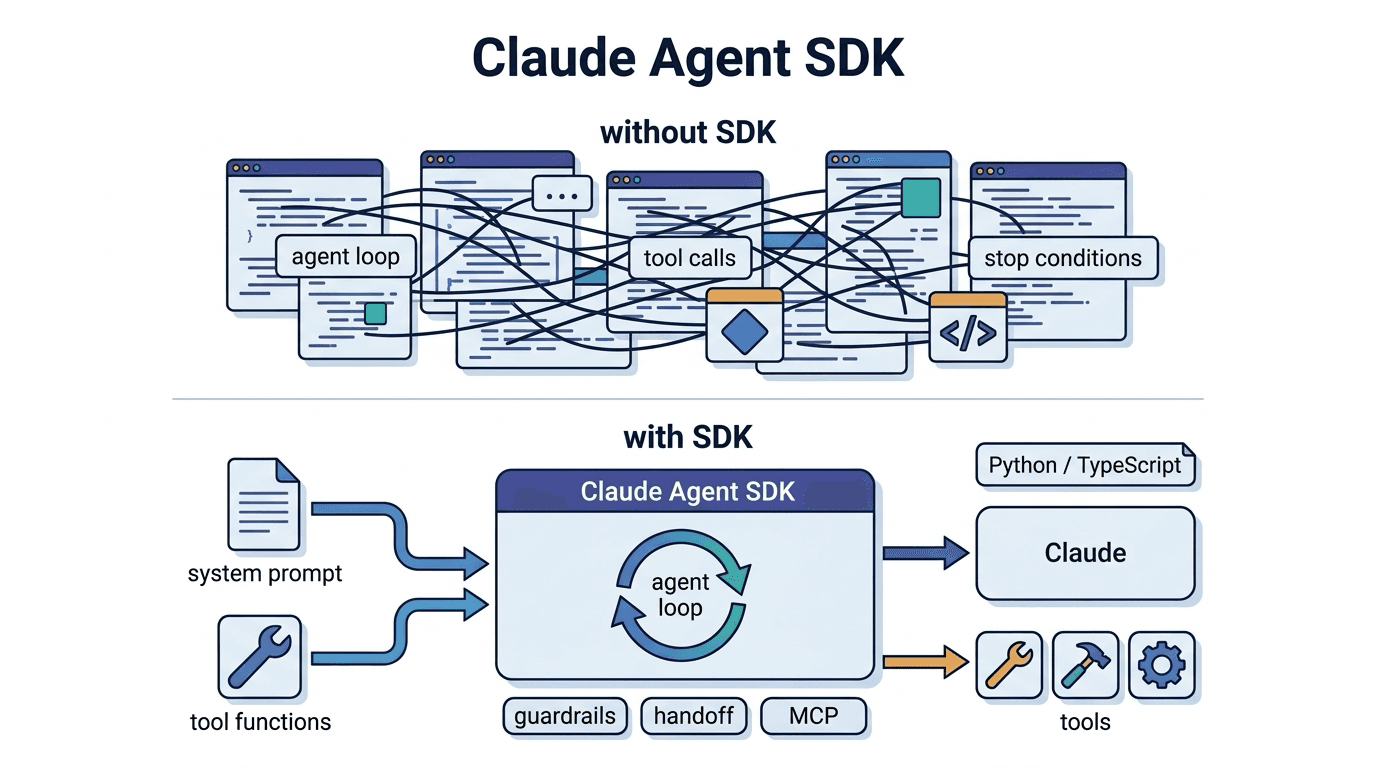
Claude Agent SDK
The Claude Agent SDK is a development kit provided by Anthropic for building AI agents. It is a fram
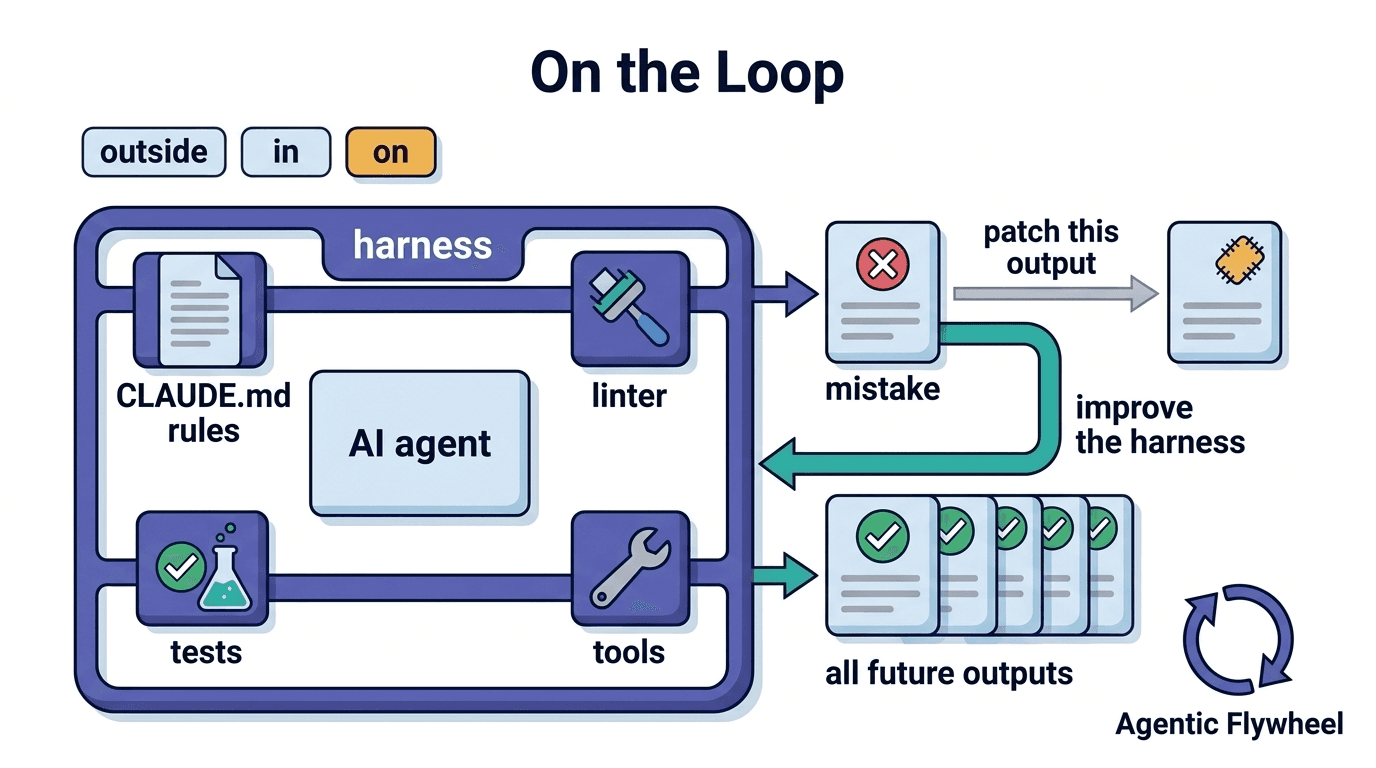
On the Loop
"On the Loop" is a collaboration mode that focuses on improving the harness (operating environment,
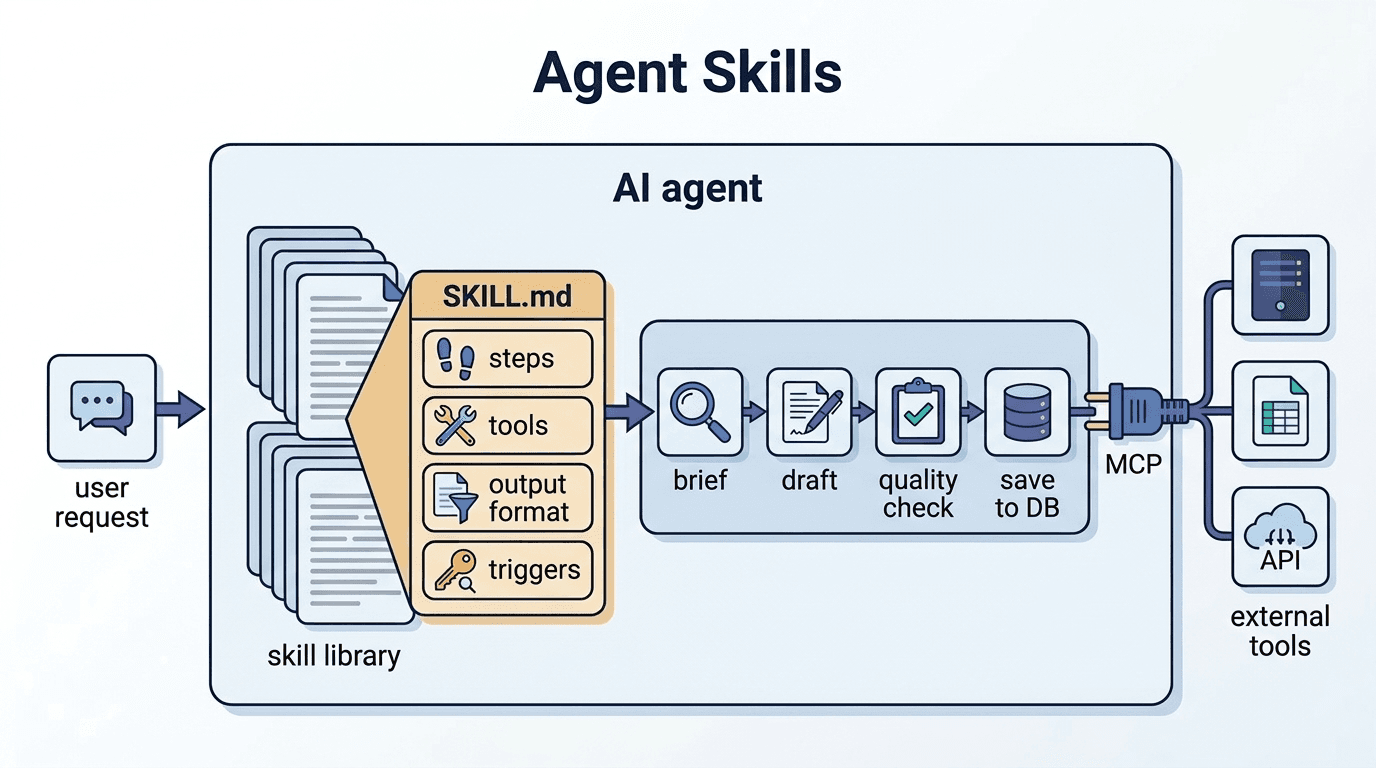
Agent Skills
Agent Skills are reusable instruction sets defined to enable AI agents to perform specific tasks or