How to Streamline In-House Training and Knowledge Transfer with AI

AI in-house training refers to the use of AI to streamline new employee education, FAQ responses, and internal knowledge sharing, while eliminating the over-reliance on specific individuals in training processes.
"We keep repeating the same explanations every time a new hire joins." "That issue? You'd have to ask Mr. A." — The more a company operates across multiple locations, the more commonly these kinds of comments are heard. Particularly in multilingual environments across Southeast Asia, including Thailand and Laos, the costs of training and knowledge transfer balloon far beyond expectations, compounded by the challenges of multilingual documentation, information gaps between offices, and excessive dependence on veteran employees.
This article explains the fundamental concepts behind using AI for in-house training, onboarding, and knowledge transfer, along with the first steps an organization should take. Rather than harboring unrealistic expectations such as "AI can fully automate training," we will outline a realistic path to implementation — one that clearly delineates what AI does best and what should remain in human hands.
By the time you finish reading, you should have a concrete sense of where in your company's training AI should be applied, and where to begin.
Why Is In-House Training and Knowledge Transfer Harder Than You Think?

The fundamental challenge of in-house training is not a lack of information, but rather a structure in which information exists yet fails to reach those who need it.
In many organizations, training manuals and procedure documents have already been created. Yet new employees still struggle, and veterans find themselves answering the same questions over and over. Behind this contradiction lie two structural problems: the fragmentation of information and its concentration in specific individuals.
Veteran Employees as "Living Databases"
Imagine a scenario at a manufacturing site. A newly assigned staff member has questions about quality inspection procedures. A manual exists, but knowledge of exceptions—such as "in practice, this case is handled differently from the manual" or "there's a special rule just for this client"—exists only in the heads of veteran employees with ten or more years of experience.
As a result, veteran employees must continuously handle "quick questions" from new hires and staff at other sites, on top of their regular duties. They have unwittingly become "living databases," and the organization constantly faces the risk of losing a portion of its institutional knowledge the moment one of them is transferred or leaves the company.
This problem grows more serious as the number of sites increases. Know-how accumulated at the headquarters in Thailand does not reach the Laos site. Procedure manuals written in Japanese cannot be read by Thai speakers. In multi-site, multilingual environments, knowledge gaps are amplified by physical distance and language barriers.
The Problem of Having a Manual But Being Unable to Access It
"The manual is written on page 3 of that file in that folder on SharePoint" — this situation is practically equivalent to having no manual at all.
In many companies, manuals and procedure documents end up in the following states:
- Scattered across multiple tools: Information is stored inconsistently across Google Drive, SharePoint, internal wikis, pinned chat messages, email attachments, and more
- No longer being updated: Procedure documents that were accurate when created are left unchanged, failing to reflect subsequent changes in business processes
- Poor searchability: Without knowing the exact file name or storage location, it's impossible to find the information you need
- Language barriers: Documents created at headquarters have not been translated into local languages
For new employees, simply being told to "read the manual" is itself an obstacle. They don't know where to find it; even when they do, it's too long to know what matters; and even after reading it, they can't connect it to their actual work. In the end, asking the colleague sitting next to them becomes the most efficient option.
How Does AI Accelerate New Employee Training?

The greatest strength of AI is its ability to "answer the same question repeatedly, without fatigue, and at a consistent level of quality" — and this directly translates to greater efficiency in new employee training.
When people hear about introducing AI into training, they may picture "AI conducting training in place of an instructor." However, the areas where it tends to be most effective right now are far more understated and practical — handling repeatedly occurring questions and assisting with searches through existing documentation.
AI Takes Over Repetitive Questions
There is a surprisingly common pattern in the questions new hires ask during their first few weeks on the job. "How do I submit an expense report?" "Where do I apply for paid leave?" "What are the steps to set up the VPN?" "What is the approval flow for this document?"—these routine questions arise repeatedly, regardless of department or location.
By loading documents such as SOPs (Standard Operating Procedures), FAQs, and internal policies into an AI assistant, new employees can ask questions at any time in a chat-based format. Whether late at night, on weekends, or for staff at other locations across different time zones, they can get answers whenever they need them.
The key point here is that the AI only responds based on what is written in the documents. The AI cannot "infer" unwritten internal norms or undocumented exception handling. Clearly defining the scope within which the AI can answer accurately is a prerequisite for a successful implementation.
A System for Searching Manuals Using Natural Language
Traditional document search required knowing the exact keywords or file names. With AI, it becomes possible to respond to natural language queries such as "What are the expense reimbursement rules for our Thailand office?" by extracting and presenting the relevant sections from related documents.
This approach is technically realized through a method known as RAG (Retrieval-Augmented Generation). Internal documents are converted into a format that AI can search, the most relevant information is retrieved in response to a query, and an answer is then generated as natural text.
This capability is particularly valuable in multilingual environments. It is becoming technically feasible, for example, to ask a question in Thai about the contents of a manual written in Japanese and receive a response in Thai. However, since translation accuracy depends on the content of the documents and the complexity of specialized terminology, it is practical to combine human review for critical business processes.
How AI is Transforming Manual Utilization and FAQ Response

The value of a manual lies not in "existing" but in "reaching the right person in the right form at the right moment" — and AI can automate this transformation.
Handing a new employee a 50-page manual and telling them to "read it" rarely results in it actually being read. And even if they do read it, there is no guarantee they will recall the relevant section the moment they need it on the job. AI functions as a means of bridging this gap between "information existing" and "information being utilized."
Converting Long Manuals into Checklists
Imagine a quality control manual for a factory: 30 pages of A4, filled with detailed notes and exception clauses that go on and on. Even after a new employee reads it and heads to the floor, they still can't immediately tell what they actually need to check for that day's work.
With AI, you can extract the key points from lengthy manuals like this and convert them into task-specific checklists. For example:
- Original text: "During inspection work, conduct a visual inspection to check for scratches, discoloration, and foreign matter, and perform a dimensional inspection to verify that measurements fall within the specified tolerances using calipers or a micrometer. If a defective product is found, fill out the designated defective product report and notify the line supervisor. Note that for products destined for Company A, an additional airtightness inspection of the packaging must be conducted."
- AI-converted checklist:
- □ Visual inspection (scratches / discoloration / foreign matter)
- □ Dimensional inspection (calipers / micrometer)
- □ Defective product found → Complete report + notify line supervisor
- □ For Company A → Add airtightness inspection
This conversion is possible to do manually, but when the volume of manuals is large or updates are frequent, the conditions that make AI-driven automatic conversion a significant time-saver tend to fall readily into place.
Making Manuals "Interactive"
Transforming static documents into "interactive manuals" that can be queried in a chat format is one of the most straightforward applications of AI.
Traditional manual lookup: "Packaging procedure for Product X" → Search the manual's table of contents → Open the relevant chapter → Read the relevant page → Determine whether it applies to your specific case
Interactive manual: "Tell me the packaging procedure for shipping Product X to a warehouse in Laos" → AI identifies the relevant section, extracts the steps that match the conditions, and provides an answer
This difference is significant, especially for less experienced staff. Even when someone doesn't know "what to search for," they can reach the relevant information simply by describing their problem in natural language.
However, making manuals interactive also introduces new risks. There is a possibility that AI may return incorrect information with apparent confidence. When manual content is outdated, or when there are contradictions between multiple documents, AI cannot make that judgment. It is necessary to always cite the source documents alongside AI responses, and to design workflows that avoid taking AI answers at face value for important operational decisions.
How AI Enables Knowledge Transfer

The success or failure of knowledge transfer depends not on AI performance, but on whether a "culture of documentation" is embedded in the organization.
Meeting minutes, technical exchanges in chat, project retrospective materials, incident response records — vast fragments of knowledge are scattered throughout organizations. In most cases, however, these remain where they were created (Slack, email, minutes files) and are never structured in a way that allows them to be searched or utilized later.
A Framework for Converting Tacit Knowledge into Explicit Knowledge
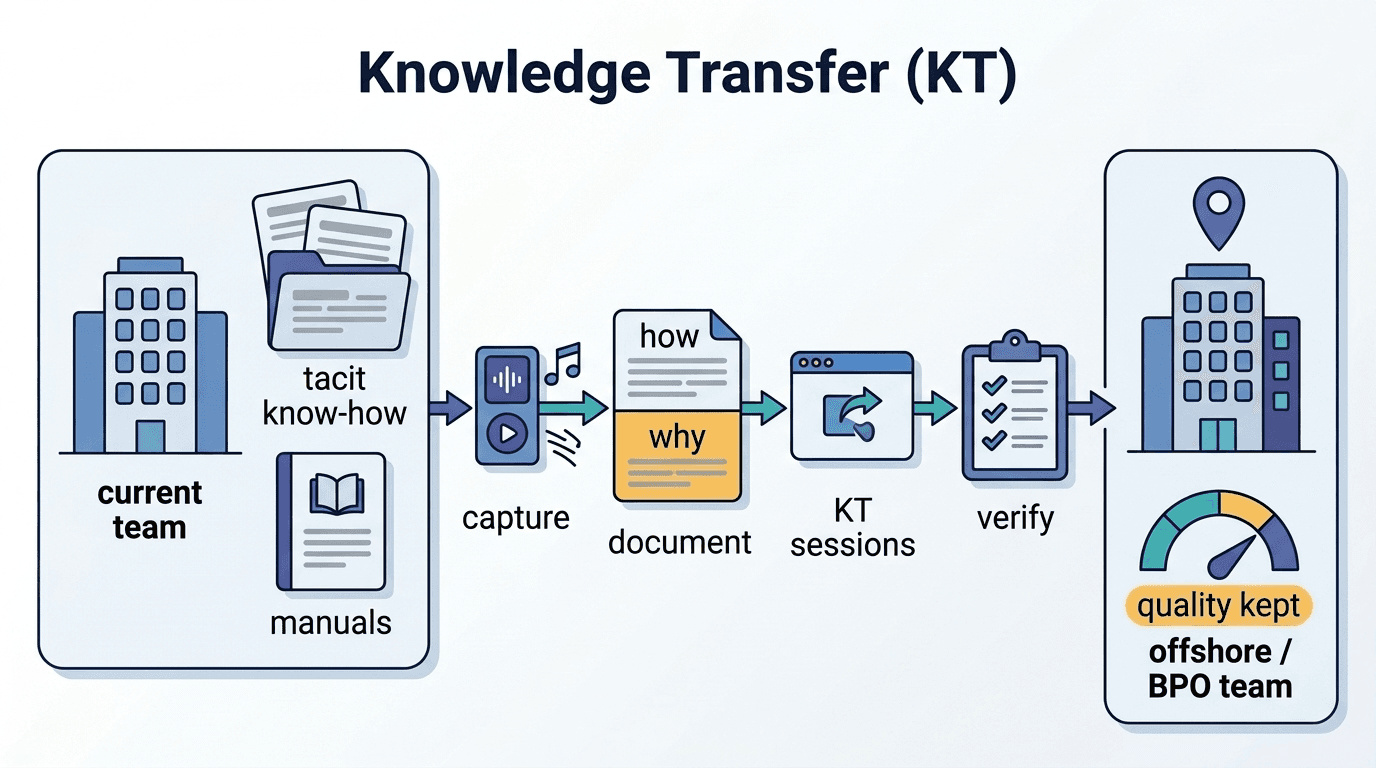
The knowledge inside experienced employees' heads—"This client is particular about invoice formatting, so I adjust it this way," or "This equipment tends to act up on humid days, so I check it first thing in the morning"—such tacit knowledge is extremely valuable to an organization, yet it is rarely documented.
AI can support the "formalization" of this tacit knowledge. Specifically:
- Automatic transcription and summarization of meeting recordings: Automatically converts insights shared verbally by veteran employees into text and stores them in a searchable format
- Knowledge extraction from chat logs: Identifies topics that are repeatedly asked and answered in internal chats, and organizes them as FAQ candidates
- Structuring project retrospectives: Categorizes free-form retrospective comments into "what went well," "areas for improvement," and "lessons for next time"
Know-how passed down through hands-on work in the field—the ear that detects a subtle abnormal sound from a machine, the eye that glances at a document's layout and senses something is off. AI cannot formalize tacit knowledge that borders on this kind of "embodied knowledge," but for know-how that can be put into words, it can significantly streamline the process of recording and organizing it.
The Importance of a "Culture of Documentation" That AI Alone Cannot Solve
Here, something must be said plainly: AI cannot generate knowledge from data that does not exist.
No matter how high-performance an AI tool you introduce, if knowledge has not been recorded in the first place, there is no information for AI to reference. If an important decision is made in a meeting but no minutes are taken, or if a veteran employee resolves an issue but the process is never shared, AI is powerless.
As a prerequisite for AI adoption, organizations need a "habit of recording knowledge." This is not a matter of technology, but of culture and systems. Specifically:
- Lower the barrier to recording: Rather than demanding perfect documentation, build the habit of capturing information even at the level of bullet points or rough notes. Since AI can organize and summarize later, the initial record can be rough.
- Incorporate recording into performance evaluations: Make "sharing knowledge" an explicit item in work performance assessments. Without incentives for the act of recording, it will be deprioritized in busy work environments.
- Standardize where records are kept: "Not knowing where to write" is the single biggest obstacle to recording. Designate one place to post information and eliminate any ambiguity.
At one company, in their rush to see results from AI adoption, they skipped building out their knowledge base and deployed an AI chatbot first. As a result, the information available for the AI to reference was too sparse, answer accuracy was poor, and employees concluded it was "unusable," preventing adoption from taking hold. The correct order of AI implementation is "recording systems → data accumulation → utilization by AI," and this order cannot be reversed.
Will AI Replace All the Roles of a Manager?

What AI can replace is "searching, organizing, and conveying information," while the domain of "observing people, making judgments, and building trust" is something only humans can do.
"If AI is handling training, what should managers and senior employees be doing?"——This question invariably comes up in organizations considering AI adoption. The answer is clear: AI and humans have entirely different areas of strength.
What AI Is Good At and What It Struggles With
| Domain | AI Capability | Why Humans Should Handle It |
|---|---|---|
| Routine FAQ responses | ◎ Excels | Can deliver consistent-quality answers repeatedly |
| Document search | ◎ Excels | Instantly extracts relevant information from large volumes of documents |
| Summarizing procedures / creating checklists | ○ Capable | Well-suited for converting structured information |
| Drafting training content | ○ Capable | Can accelerate the creation of initial drafts |
| Coaching tailored to individual growth | △ Struggles | Requires holistic reading of the other person's comprehension, emotions, and background |
| Contextually grounded feedback | △ Struggles | The root cause of "why something didn't work" is highly situation-dependent |
| Ambiguous judgment calls / handling exceptions | × Poor | Decisions in unprecedented situations require human experience and intuition |
| Building trust | × Poor | A sense of security and belonging emerges from human-to-human relationships |
By having AI take on routine tasks, managers and senior colleagues can focus on the areas that truly deserve their time—individual coaching, career discussions, and team building. AI is not a replacement for managers; it is a support tool that enables managers to concentrate on what management is fundamentally about.
Changes in Training: Before and After
Before (Pre-AI Implementation):
On her first day, new employee A receives a link to a shared folder, seven manual PDFs, three slide decks, and a note that says, "If you have any questions, ask B or C."
A starts by trying to make sense of the folder structure. She can't tell which version of each manual is the latest. She wants to ask B a question, but he looks busy and she hesitates to approach him. C is at a different office and there's a time difference. She ends up asking D, who sits next to her—but that means interrupting D's own work.
Meanwhile, looking at a typical morning for B (a veteran employee), he fields a total of eight questions from three new hires before noon. Six of those questions are identical to ones he's been asked by other new employees before.
After (Post-AI Implementation):
On her first day, A accesses an AI-enabled knowledge portal. SOPs, FAQs, and past Q&A examples are all organized and searchable in natural language.
"What's the process for expense reimbursement?" → The AI responds with the relevant SOP. "What documents do I need for a business trip to the Laos office?" → The AI pulls from the travel policy and visa-related information to provide an answer. Each response includes a link to the source document.
B's day-to-day work is transformed. Because the AI handles routine questions, the inquiries that reach B directly are narrowed down to those that genuinely require experience and judgment—things like: "I can't tell which scenario in the manual applies to this case," or "I'd like to talk through how to handle this given our relationship with the client." B can now move through his own work without constant interruptions, while still being available to provide meaningful guidance when it truly matters.
Three Steps Organizations Should Take First

AI adoption begins not with "which tool to choose" but with taking stock of "what state your organization's knowledge is currently in."
Before selecting AI tools or drawing up an implementation plan, you first need to accurately understand your organization's current situation. By starting with the following three questions, you can identify the areas where you are most likely to see results.
Starting with Three Questions
Question 1: What are the questions new employees ask most repeatedly?
List the questions that new hires have most frequently asked during their first one to three months on the job. By gathering input from HR, general affairs, and IT departments, as well as from senior employees on the front lines, you will likely find a surprisingly consistent pattern. This "repeated questions list" becomes the pool of FAQ candidates that AI should address first.
Question 2: Does critical operational knowledge exist in a searchable form?
Can you say "this procedure is documented in the manual," or are you forced to say "you'd have to ask B to find out"? The more an area relies on the latter, the higher the risk of knowledge becoming siloed in individuals. That said, it is important not to forget that before introducing AI, there must first be a phase dedicated to "recording" that knowledge.
Question 3: What falls within the scope of AI responses, and what should be escalated to a human?
It is not appropriate to leave every question to AI. For example, labor-related consultations, harassment inquiries, and security incident reports should be routed directly to the appropriate specialist rather than handled by AI. Designing these boundaries in advance is what prevents problems after AI has been deployed.
Simply answering these three questions will bring considerable clarity to the question of "where to start." Rather than aiming for a company-wide rollout all at once, the approach most likely to succeed is to start small—beginning with the area that has the highest volume of repeated questions and the most well-organized documentation.
Key Considerations When Introducing AI
There are several risks that tend to be overlooked when incorporating AI into training.
1. AI responses sound "confident" but are not necessarily correct
AI will respond as if it is certain, even when referencing outdated information or inaccurate documents. This is a structural characteristic of generative AI, and there is currently no way to eliminate it entirely. Countermeasures include:
- Designing the system to always display source documents alongside responses
- Adding a disclaimer such as: "This response is based on internal documents. Please check with the [relevant] department for the latest information."
- Building in regular operations to spot-check the quality of AI responses
2. AI is not a substitute for "good knowledge management"
AI is a tool for searching, summarizing, and presenting existing knowledge — it does not generate knowledge itself. Fundamental problems such as outdated, inaccurate, or contradictory documents will not be resolved simply by introducing AI. In fact, there is a risk that AI may present outdated information to new employees as if it were correct.
It is strongly recommended to use the AI implementation as an opportunity to simultaneously conduct a documentation audit and establish an update workflow.
3. "Managing expectations" is the top priority in the early stages of implementation
In the first few weeks after introducing an AI tool, dissatisfaction with low response accuracy or limited coverage tends to surface. Once the first impression of "this is useless" takes hold, usage rates are difficult to recover even after improvements are made. The key to successful adoption is to clearly communicate upfront — before launch — that "initially, the tool can handle questions within this scope, and accuracy will improve through use," and to have a mechanism in place for collecting feedback.
FAQ
Q1: Is AI Really Suitable for New Employee Training?
In areas such as standardized FAQ responses, manual searches, and procedure summarization, the conditions for AI to deliver high effectiveness tend to align well. In particular, environments where "the same questions arise repeatedly" and "the information needed to answer them exists as documentation" are well-suited to seeing tangible results from implementation. On the other hand, guidance that requires judgment tailored to individual circumstances, and mentoring based on trust relationships, fall outside the scope of AI's applicability. It is more realistic to position AI not as an "all-purpose training instructor," but as a "24/7 internal FAQ desk."
Q2: Can AI Replace a Boss?
The only part that AI can replace is the "information processing" aspect—searching, organizing, and presenting information. Roles such as observing an individual's situation and offering growth advice, encouraging a subordinate who has failed, and managing interpersonal relationships within a team are tasks that only humans can perform. If anything, the introduction of AI frees managers from routine tasks, allowing them to dedicate more time to this kind of "guidance that only humans can provide."
Q3: Can we get started even if our internal documentation is not in order?
You can start, but order matters. Introducing an AI chatbot with little to no documentation will result in extremely poor answer accuracy, as there is no information to reference. It is recommended to begin by documenting at least the most frequently asked questions as an FAQ, building a small knowledge base from there. A perfect manual system is not necessary. Even bullet-point-level notes can serve as referenceable information for AI.
Q4: What are the use cases to try first?
Internal FAQ support is the easiest area to get started with and the one where results are most visible. There are three reasons for this. First, the patterns of questions and answers are relatively standardized. Second, the effectiveness is easy to measure in the form of "reduction in the number of inquiries." Third, the documents involved (work regulations, expense reimbursement rules, IT setup procedures, etc.) already exist in many companies. The low-risk approach is to first achieve results with FAQ support, then gradually expand into areas such as converting manuals into interactive formats and building out knowledge bases.
Summary
AI is not a magic tool that automates everything in corporate training. However, it is a means to systematically address the personalization of training by structuring "recurring information transfer" — such as FAQ responses, manual summarization, and knowledge sharing.
Key takeaways from this article:
- The fundamental challenge of training is not a lack of information, but a "structural problem" in which the right information fails to reach the right people in the right form
- Where AI excels is in standardized FAQs, document search, and summarizing procedures into checklists
- What humans should own is individual coaching, contextual judgment, and building trust
- The prerequisite for implementation is a "culture of documenting knowledge" — AI cannot function without data
- How to get started begins with three questions: What questions are asked repeatedly? Is knowledge searchable? Where is the boundary between AI and humans?
For companies operating across multiple locations and languages in particular, systematizing knowledge sharing through AI can be a practical means of closing information gaps between sites and delivering a consistently high-quality training experience at every location.
Start by listing the ten most frequently repeated questions within your organization. That is the first step toward leveraging AI.
Author & Supervisor

Chi
Majored in Information Science at the National University of Laos, where he contributed to the development of statistical software, building a practical foundation in data analysis and programming. He began his career in web and application development in 2021, and from 2023 onward gained extensive hands-on experience across both frontend and backend domains. At our company, he is responsible for the design and development of AI-powered web services, and is involved in projects that integrate natural language processing (NLP), machine learning, and generative AI and large language models (LLMs) into business systems. He has a voracious appetite for keeping up with the latest technologies and places great value on moving swiftly from technical validation to production implementation.
Recommended Articles


Terms related to this article
Knowledge Transfer
Knowledge transfer refers to the process of systematically transferring business knowledge, know-how
AI Literacy (AI Literacy)
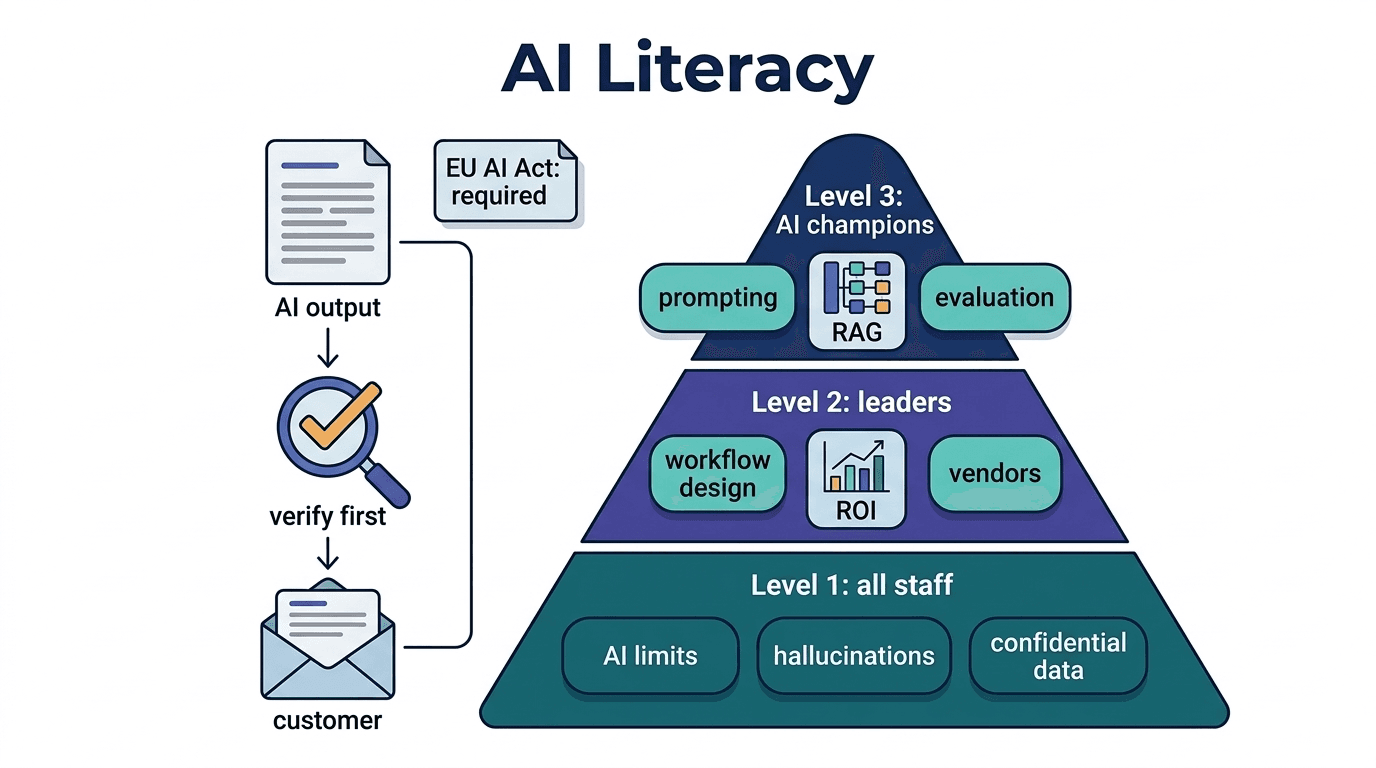
Knowledge and skills to understand the basic concepts, limitations, and risks of AI, and to appropri
AI Employee (AI Employee)
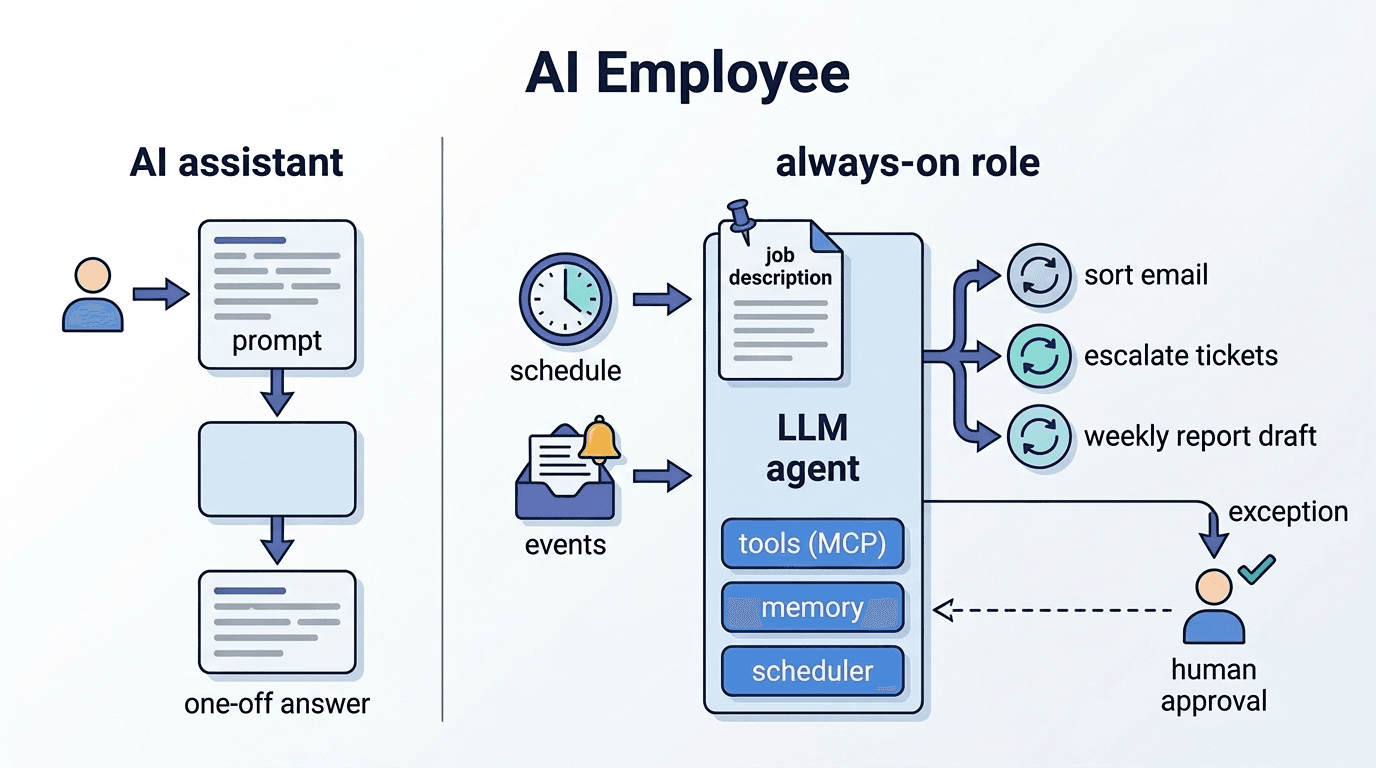
An autonomous AI agent that takes on a specific business role and continuously performs tasks in the